
Presentation: Door management
- Make
- Citroën
- Model
- C3 Factory Workshop Manual
- Year
- 2002–2009
- Section
- Lock › Presentation: Door management
Presentation: Door management
1. Variation of equipment on vehicles
| - | C3 | C3 Pluriel | C2 |
| Electric locking/unlocking of 4 doors and tailgate | X | - | - |
| Electric locking/unlocking of 2 doors, rear screen and rear tailgate | - | X | X |
| Deadlocking | X (*) | X (*) | X (*) |
(*) According to vehicle equipment.
2. Foreword
Management of doors and tailgate consists of the locking / unlocking of the front and rear doors and of the tailgate.
2.1. Control devices
The doors and tailgate locking/unlocking devices are the following:
- An exterior lock on the driver’s door
- Two high frequency remote controls with two buttons for vehicles equipped with deadlocking
- One remote control for vehicles without deadlocking
- One central locking button for locking/unlocking of doors and tailgate
- An exterior electric button for locking the tailgate
- An electric exterior push-button for triggering the tailgate lock
- An electric exterior push-button for triggering the rear screen lock
- Mechanical controls, one on each door, for deactivating opening of doors using the interior door handles
- Mechanical controls, one on each rear door, for deactivating opening of the rear doors using the interior door handles (according to model)
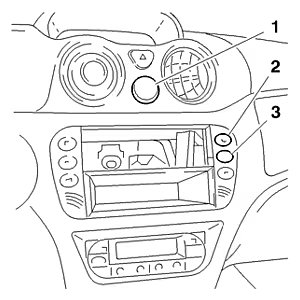
| Reference | Designation |
|---|---|
| 1 | One central locking button for locking/unlocking of doors and tailgate |
| 2 | Electrical control for deactivating opening of rear doors using the interior door handles (child safety) |
| 3 | Button for memorisation/deactivation of the overspeed alert function |
2.2. Display devices
The display devices for locking / unlocking are the following:
- Lighting of the interior lamps (vehicle location, locking, opening of doors)
- Lighting/extinction of a red diode on the central control button
- The direction indicators flash
- Child safety confirmation symbol on the multifunction screen
- Doors and tailgate status (locked/unlocked) confirmation symbol on multifunction screen type C
- Doors and tailgate status message on multifunction screen type B
- Message on the multifunction screen when the remote control battery is spent
3. Defining the doors and tailgate status
| Condition | Definitions |
|---|---|
| Unlocked | The opening of doors and tailgate is possible from the outside and from the inside of the vehicle |
| Locked | The opening of doors and tailgate is impossible from the outside of the vehicle |
| Deadlocked | The opening of doors and tailgate is impossible from the outside and from the inside of the vehicle |
| Door closed | Door closed to the second catch of the lock |
| Rebound | Immediate unlocking after a locking or deadlocking command |
| Child lock | The rear doors cannot be opened using controls that can be accessed by the rear passengers |
| Indicators | The customer is informed by signalling that the locking/unlocking request has been actioned, by a permanent lighting of direction indicators and side repeaters for 2 seconds for locking, by flashing of the direction indicators and side repeaters for 2 seconds for unlocking of the vehicle |
| Location | The vehicle location signals to the user the position of the vehicle, by a flashing of the direction indicators and a lighting of the interior lamps for 10 seconds (under certain conditions see principles of operation) |
4. Flow chart
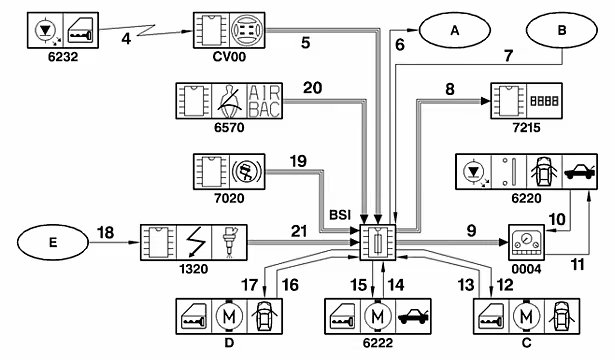
Key:
- Single arrow: Wire connection
- Triple arrow: Multiplexed connection
| Components | |
|---|---|
| A | Direction indicators |
| B | Interior opening control |
| C | Lock assembly for rear doors |
| D | Lock assembly for front doors |
| E | Vehicle speed information |
| BSI | Built-in systems interface |
| CV00 | Switch module at the steering wheel |
| 0004 | Instrument panel |
| 1320 | Engine ECU |
| 6220 | Door locking central switch |
| 6232 | High frequency transmitter |
| 6570 | Air bag and pretensioners control unit |
| 7020 | ABS ECU (or ESP according to version) (*) |
| 7215 | multifunction screen |
(*) Depending on the equipment on the vehicle, the vehicle speed information comes either from the vehicle sensor or from the ESP or ABS ECU (according to equipment).
| Connections | ||
|---|---|---|
| N° | signal | Nature of signal |
| 4 | Doors and tailgate unlocking request. Doors and tailgate locking request. Doors and tailgate deadlocking request (according to equipment) | High frequency signal |
| 5 | Doors and tailgate unlocking request. Doors and tailgate locking request. Doors and tailgate deadlocking request (according to equipment) | VAN CAR1 |
| 6 | Lighting of the direction indicators | All or nothing |
| 7 | Opening request via the interior opening controls | All or nothing |
| 8 | Display of doors and tailgate status. Display of activation of child safety | Comfort VAN |
| 9 | Display of doors and tailgate status. Display of activation of child safety. Lighting/extinction of the led | Comfort VAN |
| 10 | Central unlocking request. Central locking request | All or nothing |
| 11 | Lighting of the doors and tailgate status led | All or nothing |
| 12 | Control of the rear door lock actuators | All or nothing |
| 13 | Information on status of door open switches (CPO) on the rear doors | All or nothing |
| 14 | Information on the status of the door open switch (CPO) on the boot or tailgate | All or nothing |
| 15 | Control of the boot or tailgate lock actuators | All or nothing |
| 16 | Information on door open switches (CPO) on the front doors | All or nothing |
| 17 | Control of the front door lock actuators | All or nothing |
| 18 | Vehicle speed information (*) | Analogue |
| 19 | Vehicle speed information (*) | CAN |
| 20 | Pyrotechnic component deployment information (according to equipment) | VAN CAR1 |
| 21 | Vehicle speed information (*) | CAN |
(*) Depending on the equipment on the vehicle, the vehicle speed information comes either from the vehicle sensor or from the ESP or ABS ECU (according to equipment).
5. Rear screen
5.1. Flow chart C3 Pluriel
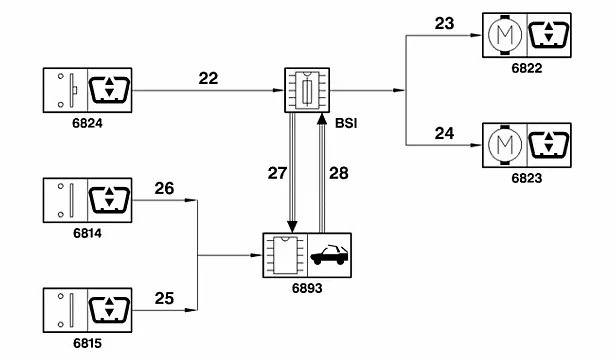
| Components | |
|---|---|
| BSI | Built-in systems interface |
| 6814 | Rear screen lock LH switch (locked/unlocked) |
| 6815 | Rear screen lock RH switch (locked/unlocked) |
| 6822 | Rear screen LH lock actuator |
| 6823 | Rear screen RH lock actuator |
| 6824 | Rear screen opening switch (opening request from the user) |
| 6893 | Retractable roof ECU |
| Connections | ||
|---|---|---|
| No. of link | signal | Nature of signal |
| 22 | Rear screen opening request | All or nothing |
| 23 | Rear screen LH lock actuator control (unlocking of the LH lock) | All or nothing |
| 24 | Rear screen LH lock actuator control (unlocking of the LH lock) | All or nothing |
| 25 | Status of the RH and LH rear screen lock switches | VAN CAR2 |
| 26 | Information from the RH rear screen switch (locked/unlocked) | All or nothing |
| 27 | Information from the LH rear screen switch (locked/unlocked) | All or nothing |
| 28 | Rear screen opening request. Request for the status of the RH and LH rear screen switches | VAN CAR2 |
5.2. Flow chart C2
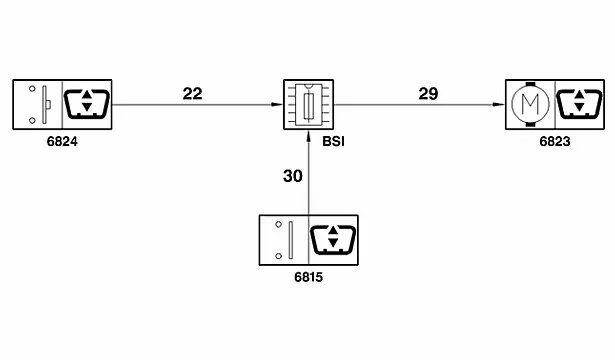
| Components | |
|---|---|
| BSI | Built-in systems interface |
| 6815 | Rear screen lock RH switch (locked/unlocked) |
| 6823 | Rear screen RH lock actuator |
| 6824 | Rear screen opening switch (opening request from the user) |
| Connections | ||
|---|---|---|
| No. of link | signal | Nature of signal |
| 22 | Rear screen opening request | All or nothing |
| 29 | Rear screen RH lock actuator control (unlocking of the RH lock) | All or nothing |
| 30 | Status of the RH rear screen lock switch | VAN CAR2 |
6. High frequency remote control
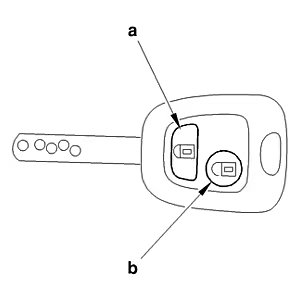
| Reference | Description |
|---|---|
| "a" | Door locking. Vehicle location |
| "b" | Unlock doors |
6.1. Remote control functioning conditions
The remote control functions are activated.
| Condition |
|---|
| If the key is not inserted in the ignition |
| Or if the key is in the ignition in the stop position, 1 minute after the opening of the driver’s door Or if the key is in the ignition in the stop position, 1 minute after the return of the key from the +ACC position to the stop position |
6.2. Operations performed
| The remote control activates the following functions | ||
|---|---|---|
| Function | Designation | Performance |
| Unlocking | A first press unlocks the doors and tailgate | Range 10 m |
| Locking | Opening of doors and tailgate is impossible from outside the vehicle | Range 10 m |
| Deadlocking | Opening of doors and tailgate is impossible from outside and from inside the vehicle | Range 10 m |
| Location | Flashing of the direction indicators and lighting of the interior lamps for 10 seconds | Range 30 m |
N.B.: A diode and a message on the instrument panel indicate to the user that the battery is worn when the performances are reduced by around 30 %.
6.3. Matching with the vehicle
Use of the remote control necessitates matching with the vehicle.
The coded message sent to the receiver by each remote control is composed of the following codes:
- A fixed code linked to the key
- A rolling code matched with the vehicle’s receiver
- A code corresponding to the action to be performed
- A code corresponding to the condition of charge of the batteries
6.4. Resynchronisation of the remote control
The rolling code of the remote control is modified each time the remote control is used.
A small offset between the rolling code expected by the receiver and that transmitted by the remote control is tolerated (case of use of the remote control outside the range of the receiver).
In the event of this tolerance being exceeded it is necessary to resynchronise the remote control.
The tolerance is of 255 offsets.
| To resynchronise the remote control, this procedure has to be followed | |
|---|---|
| Stage | Action |
| 1 | Switch on the ignition using the key whose remote control is to be resynchronised |
| 2 | Press one of the transmitter buttons within 10 seconds of the appearance of ignition+ |
N.B.: For a vehicle equipped with the under-inflation function the vehicle should remain at zero speed during the resynchronisation operation.
Parts & tools for this job For 2002 Citroën C3
- TOOLTrim removal tool kitSearch: trim removal tool kit
- PARTTouch-up paintSearch: Citroën touch up paint
- PARTPanel clip assortmentSearch: Citroën panel clips assortment
As an Amazon Associate we earn from qualifying purchases.