
Conversion: Driving school vehicle to private vehicle
- Make
- Citroën
- Model
- C3 Factory Workshop Manual
- Year
- 2002–2009
- Section
- Pedal bracket › Conversion: Driving school vehicle to private vehicle
Conversion: Driving school vehicle to private vehicle
N.B.: It is possible to de-equip a driving school vehicle without removing the dashboard.
1. Operations to be carried out
Remove:
- The dual-control pedal gear
- The additional "driving school" manufacturer’s plate
- The additional exterior rear view mirror on the passenger’s side
- The additional driving school interior rear view mirror and its support
- The driving school monitor control unit
Configure the built in systems interface (BSI).
2. Dual-control pedal gear
2.1. Passenger ’s side
Remove:
- The storage compartment (see the relevant operation)
- The trims under the dashboard (see the relevant operation)
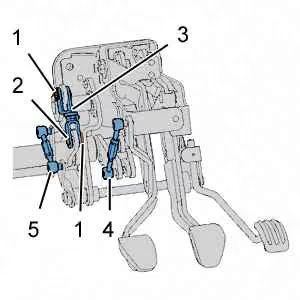
Remove:
- The clips (1)
- The shafts (2)
- The push rod (3)
- The rods (4) and (5)
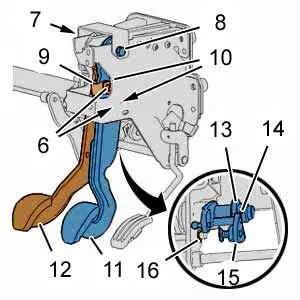
Remove:
- The clips (10)
- The shafts (6)
- The transfer bar (9)
- The shaft nut (7)
- The shaft (8)
- The brake pedal (11)
- The clutch pedal (12)
- The pin (14)
- The levers (13) and (15)
- The circlip (16)
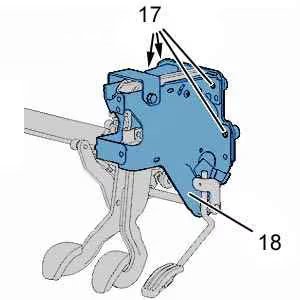
Remove the nuts (17).
Disengage the pedal gear plate (18) from the fixing pins.
Disengage the pedal gear plate (18) from the transmission shafts.
2.2. On the driver’s side
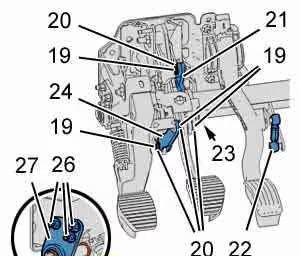
Remove:
- The clips (20)
- The shafts (19)
- The rods (21), (22) and (24)
- The circlip (23)
- The circlip (25)
- The bolts (26)
- The support plate (27)
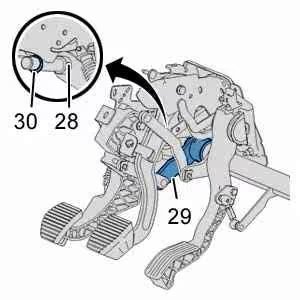
Remove:
- The circlip (30)
- The pin (28)
- The lever (29)
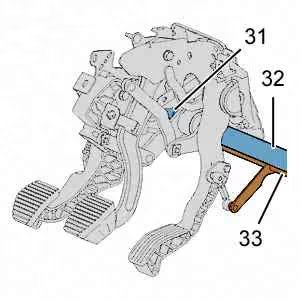
Remove (from the passenger’s side):
- The shaft (31) and pipe (32) assembly
- The shaft (33)
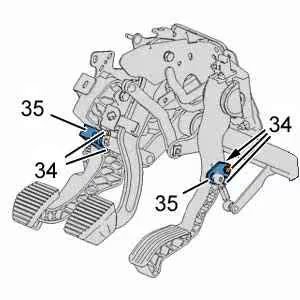
Remove:
- The bolts (34)
- The brackets (35)
2.3. Additional "driving school" manufacturer’s plate
Remove the additional "driving school" manufacturer’s plate, located beside the manufacturer’s plate.
2.4. Additional exterior rear view mirror
Remove the additional exterior rear view mirror.
2.5. Additional interior rear view mirror and support
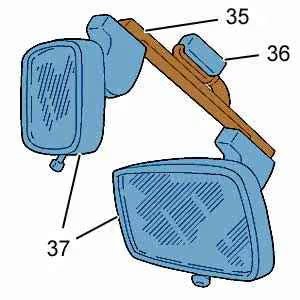
Remove:
- The rear view mirrors (37)
- The double support (35)
Fit one of the rear view mirrors (37) on the original support (36).
2.6. Monitor control unit
Unclip:
- The monitor control unit from its support
- The monitor control unit support
Stow the remaining harness in the dashboard.
Fit an original glovebox in the dual-control module location.
3. Configuration of the BSI (BSI)
3.1. Configuration procedure Using the "LEXIA" diagnostic equipment
Make the following selections in the diagnostic tool:
- Select the menu "Diagnosis"
- Select the vehicle "CITROEN 3"
- Enter the RPO no.
- Select the menu "Global Test"
- Select the "BSI" ECU
- Selection the "CONFIGURATION" (PROGRAMMING) menu
- Selection the "MANUAL CONFIGURATION" menu
- Select the menu "MANUAL CONFIGURATION WITHOUT DATA"
- Select the menu "CONFIGURATION"
- Select the menu "CONFIGURATION"
- Configure the parameter "DRIVING SCHOOL OPTION" to the value "ABSENT"
- Press button (F1) to start the programming
- Enter the access code
- Switch off the ignition
- The diagnostic tool confirms that the programming of the configuration options has been correctly performed
- Press the return key (F9)
- Switch on the ignition
- Press the return key (F9)
- Select the menu "ECUs PRESENT"
- Configure the parameter "DRIVING SCHOOL MODULE" to the value "ABSENT"
- Press button (F1) to start the programming
- Enter the access code
- Switch off the ignition
- The diagnostic tool confirms that the programming of the ECUs present has been correctly performed
3.2. Configuration procedure Using the "PROXIA" diagnostic equipment
Make the following selections in the diagnostic tool:
- Select the menu "DOWNLOADING/PROGRAMMING"
- Selection the "CONFIGURATION" (PROGRAMMING) menu
- Select the vehicle "CITROEN 3"
- Enter the RPO no.
- Select the "BSI" ECU
- Switch on the ignition
- Selection the "MANUAL CONFIGURATION" menu
- Select the menu "MANUAL CONFIGURATION WITHOUT DATA"
- Select the menu "CONFIGURATION"
- Select the menu "CONFIGURATION"
- Switch off the ignition
- Configure the parameter "DRIVING SCHOOL OPTION" to the value "ABSENT"
- Press button (F5) to start the programming
- Enter the After Sales code
- Press the return key (F1)
- Press the return key (F1)
- Select the menu "ECUs PRESENT"
- Configure the parameter "DRIVING SCHOOL MODULE" to absent (remove the cross opposite the parameter)
- Press button (F5) to start the programming
- Press the button (F1) to quit
4. Reconversion time
| Designation | Code | Duration |
|---|---|---|
| Removing the dual-control (rear view mirrors, pedals, levers, slide control, electrical controls) | 99071310 | 1h20 T1 |
| Configuration of the BSI (BSI) | 1204691 | 0h50 T3 |
Parts & tools for this job For 2002 Citroën C3
- PARTBrake padsSearch: Citroën C3 2002 brake pads
- TOOLBrake bleeder kitSearch: one man brake bleeder kit
- FLUIDBrake fluidSearch: brake fluid
As an Amazon Associate we earn from qualifying purchases.