
Conversion: Driving school vehicle to private vehicle
- Make
- Citroën
- Model
- C4 Factory Workshop Manual
- Year
- 2004–2010
- Section
- Pedal bracket › Conversion: Driving school vehicle to private vehicle
Conversion: Driving school vehicle to private vehicle
N.B.: It is possible to de-equip a driving school vehicle without removing the dashboard.
1. Operations to be carried out
Remove:
- The storage tray with the instructor control unit
- The dual-control pedal gear
- The control bars
- The accelerator pedal on the driver’s side ()
- The pedal gear on the driver’s side
- The additional "driving-school" manufacturer’s label
- The additional exterior rear view mirror on the passenger’s side
- The additional driving school interior rear view mirror and its support
Refit:
- An original pedal on the driver’s side
- An accelerator pedal with speed limiter function (LVV) *
- An original storage tray
N.B.: * LVV: Vehicle speed limiter.
Configure the built in systems interface (BSI).
1.1. Dual-control pedal gear: Passenger ’s side
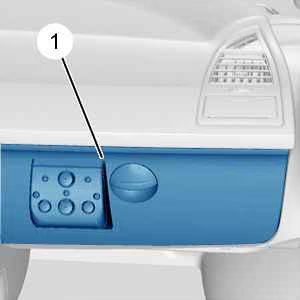
Remove the storage tray (1) with the instructor control unit.
Stow the harness for the instructor control unit in the dashboard.
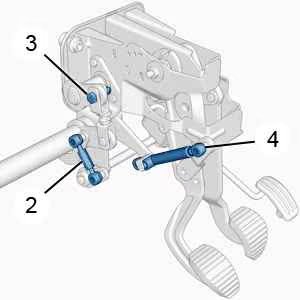
Remove:
- The push rod (2)
- The (3) bolt
- The push rod (4)
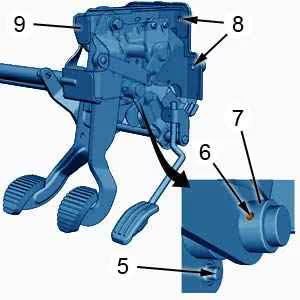
Remove:
- The circlip (5)
- The pin (6)
- The lever (7)
- The nuts (8)
- The pedal gear (9)
1.2. Dual-control pedal gear: On the driver’s side
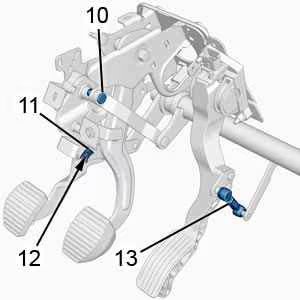
Remove:
- The (10) bolt
- The clip (11)
- The shaft (12)
- The push rod (13)
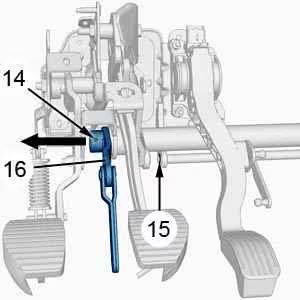
Remove:
- The circlip (15)
- The pin (14)
- The lever (16)
1.3. Control bar
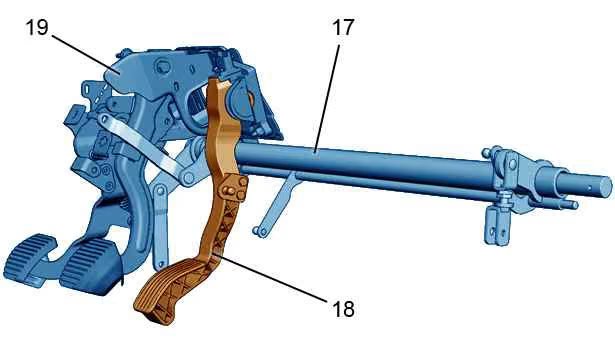
Remove:
- The control bar assembly (17) (from the passenger’s side)
- The accelerator pedal on the driver’s side (18)
Unplug:
- The brake switch
- The clutch switch
- The clutch sender
Remove the pedal gear on the driver’s side (19).
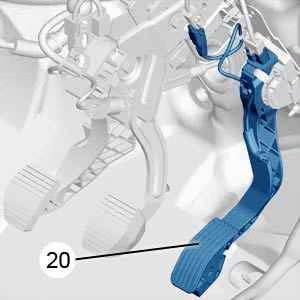
Refit an original pedal gear.
Reconnect:
- The brake switch
- The clutch switch
- The clutch sender
Fit an accelerator pedal (20) with speed limiter function (LVV) *.
N.B.: * LVV: Vehicle speed limiter.
1.4. Additional "driving-school" manufacturer’s label
Remove the additional "driving-school" manufacturer’s label.
1.5. Additional exterior rear view mirror
Remove the additional exterior rear view mirror.
1.6. Additional interior rear view mirror and support
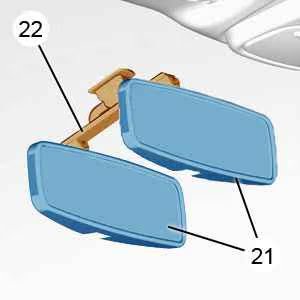
Remove:
- The rear view mirrors (21)
- The bracket (22)
Fit a rear view mirror (21) on the original support.
1.7. Glovebox
Fir an original storage tray.
1.8. De-installation of the "driving-school module" with the aid of the diagnostic tool: Procedure for de-installation of the "driving-school module" using LEXIA
Make the following selections in the diagnostic tool:
- "DIAGNOSIS"
- Select the vehicle "CITROEN C4"
- "EQUIPMENT"
- "DRIVING SCHOOL MODULE"
- Switch on the ignition
- "DE-INSTALLATION"
Follow the instructions given in the diagnostic tool.
CAUTION: If the driving-school module is not accessible in the equipment de-installation menu, use the procedure for programming the BSI using the diagnostic tool.
1.9. De-installation of the "driving-school module" with the aid of the diagnostic tool: Configuration procedure (Using the "LEXIA" diagnostic equipment)
CAUTION: This procedure for programming the BSI must only be used if the driving-school module is absent from the equipment de-installation menu.
Make the following selections in the diagnostic tool:
- Select the menu "Diagnosis"
- Select the vehicle "CITROEN C4"
- Enter the RPO no.
- Select the menu "Global Test"
- Switch on the ignition
- Select the "BSI" ECU
- Selection the "CONFIGURATION" (PROGRAMMING) menu
- Selection the "MANUAL CONFIGURATION" menu
- Select the menu "CONFIGURATION"
- Select the menu "VEHICLE DEFINITION - EQUIPMENT - DRIVER’S INFORMATION"
- Configure the parameter "DRIVING SCHOOL OPTION" to the value "ABSENT"
- Configure the parameter "Presence and type of vehicle speed limitation" to "Cruise control and speed limiter"
- Press button (F1) to start the programming
- Enter the access code
- The diagnostic tool confirms that the programming of the configuration options has been correctly performed
- Press the return key (F9)
- Press the return key (F9)
- Select the menu "ECUs PRESENT"
- Configure the parameter "DRIVING SCHOOL MODULE" to the value "ABSENT"
- Press button (F1) to start the programming
- Enter the access code
- The diagnostic tool confirms that the programming of the ECUs present has been correctly performed
- Return to the global test
- Select the injection ECU
- Select the menu corresponding to the injection ECU on the vehicle
- Check the programming of the parameters concerning the speed limitation
- Configure these parameters to activate the speed limiter
- Validate the modifications performed in the programming
- Press on the return key (F9) to quit
1.10. De-installation of the "driving-school module" with the aid of the diagnostic tool: Procedure for de-installation of the "driving-school module" using PROXIA
Make the following selections in the diagnostic tool:
- "DOWNLOADING/CONFIGURATION"
- "INSTALLATON/DE-INSTALLATION"
- Select the vehicle "CITROEN C4"
- Enter the RPO no.
- "DRIVING SCHOOL MODULE"
- "DE-INSTALLATION OF EQUIPMENT"
Follow the instructions given in the diagnostic tool.
CAUTION: If the driving-school module is not accessible in the equipment de-installation menu, use the procedure for programming the BSI using the diagnostic tool.
1.11. De-installation of the "driving-school module" with the aid of the diagnostic tool: Configuration procedure Using the "PROXIA" diagnostic equipment
CAUTION: This procedure for programming the BSI must only be used if the driving-school module is absent from the equipment de-installation menu.
Make the following selections in the diagnostic tool:
- Select the menu "DOWNLOADING/PROGRAMMING"
- Selection the "CONFIGURATION" (PROGRAMMING) menu
- Select the vehicle "CITROEN C4"
- Enter the RPO no.
- Select the "BSI" ECU
- Switch on the ignition
- Selection the "MANUAL CONFIGURATION" menu
- Select the menu "CONFIGURATION"
- Select the menu "VEHICLE DEFINITION - EQUIPMENT - DRIVER’S INFORMATION"
- Configure the parameter "DRIVING SCHOOL OPTION" to the value "ABSENT"
- Configure the parameter "Presence and type of vehicle speed limitation" to "Cruise control and speed limiter"
- Press button (F5) to start the programming
- Enter the After Sales code
- Press the return key (F1)
- Select the menu "POWER UNIT"
- Select the menu corresponding to the injection ECU on the vehicle
- Check the programming of the parameters concerning the speed limitation
- Configure these parameters to activate the speed limiter
- Press the return key (F1)
- Press the return key (F1)
- Select the menu "ECUs PRESENT"
- Configure the parameter "DRIVING SCHOOL MODULE" to absent (remove the cross opposite the parameter)
- Press button (F5) to start the programming
- Press the button (F1) to quit
2. Reconversion time
| Designation | Code | Duration |
|---|---|---|
| Removing the dual-control (rear view mirrors, pedals, levers, slide control, electrical controls) | 99074810 | 3,10 hr T1 |
| Configuration of the BSI (BSI) | 12046811 | 0,30 hr T3 |
Parts & tools for this job For 2004 Citroën C4
- PARTBrake padsSearch: Citroën C4 2004 brake pads
- TOOLBrake bleeder kitSearch: one man brake bleeder kit
- FLUIDBrake fluidSearch: brake fluid
As an Amazon Associate we earn from qualifying purchases.