
Removing - Refitting: Stop lamp switch
- Make
- Citroën
- Model
- Nemo Multispace Factory Workshop Manual
- Year
- 2008–2017
- Section
- Pedal bracket › Removing - Refitting: Stop lamp switch
Removing - Refitting: Stop lamp switch
ESSENTIAL: Observe the safety and cleanliness recommendations.
1. Tooling
Equipment: A brake pedal depressor.
2. Removing
Remove the dashboard lower trims.
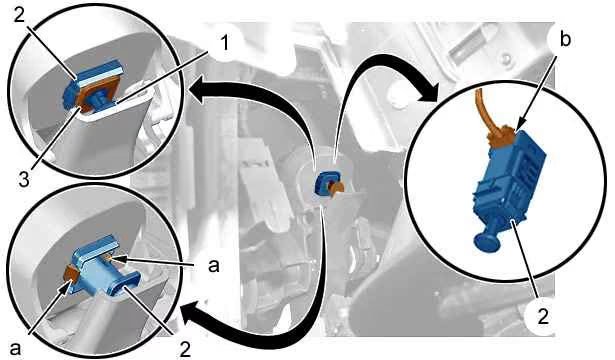
Press the brake pedal and keep it pressed (Maximum); Using a pedal depressor.
Pull the button (1) of the stoplight switch (2) (Maximum).
Release the button mounting (3) of the stoplight switch (2).
Unclip: The stop lamp connector (2) (at "a").
Release the stoplight switch (2) from the pedal bracket.
Disconnect the connector (at "b").
Remove: The stop lamp connector (2).
3. Refitting
Connect the connector (at "b").
Position: The stop lamp connector (2).
Clip: The stop lamp connector (2) (at "a").
Pull the button (1) of the stoplight switch (2) (Maximum).
Remove the pedal depressing tool.
N.B.: The button (1) is adjusted when the brake pedal returns to the rest position.
4. Check
Check the switching on of the stoplamps when the brake pedal is applied.
4.1. Brake pedal at rest
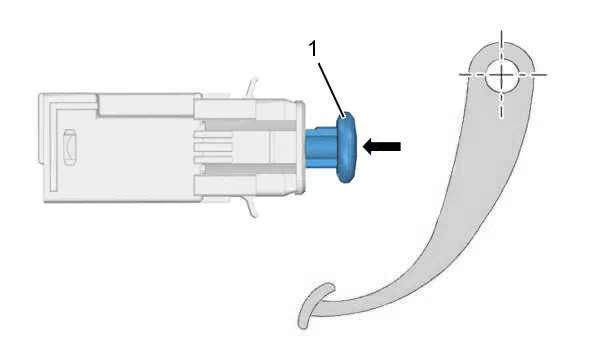
The pushbutton (1) must be in contact with the brake pedal.
N.B.: The brake light switch must not be used as a stop for the brake pedal.
4.2. Brake pedal pressed down
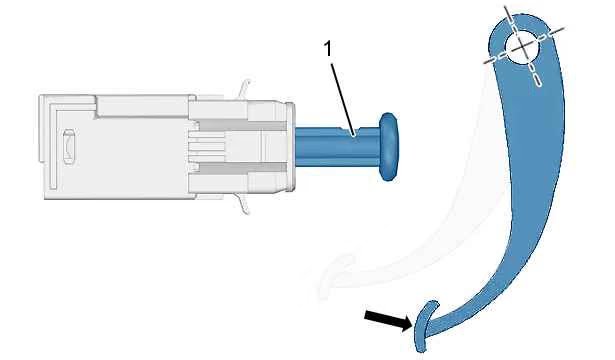
The pushbutton (1) is no longer in contact with the brake pedal.
5. Refitting (continued)
Refit: The lower trims from the fascia panel.
Parts & tools for this job For 2008 Citroën Nemo
- TOOLOBD2 scannerSearch: OBD2 scanner
- TOOLDigital multimeterSearch: automotive digital multimeter
- TOOLBack-probe test leadsSearch: back probe test leads
As an Amazon Associate we earn from qualifying purchases.