
Timing Belt: Diagrams (page 10 of 14)
- Make
- Mitsubishi
- Model
- Lancer
- Engine
- L4-2.4L SOHC
- Year
- 2005
- Section
- Timing Belt
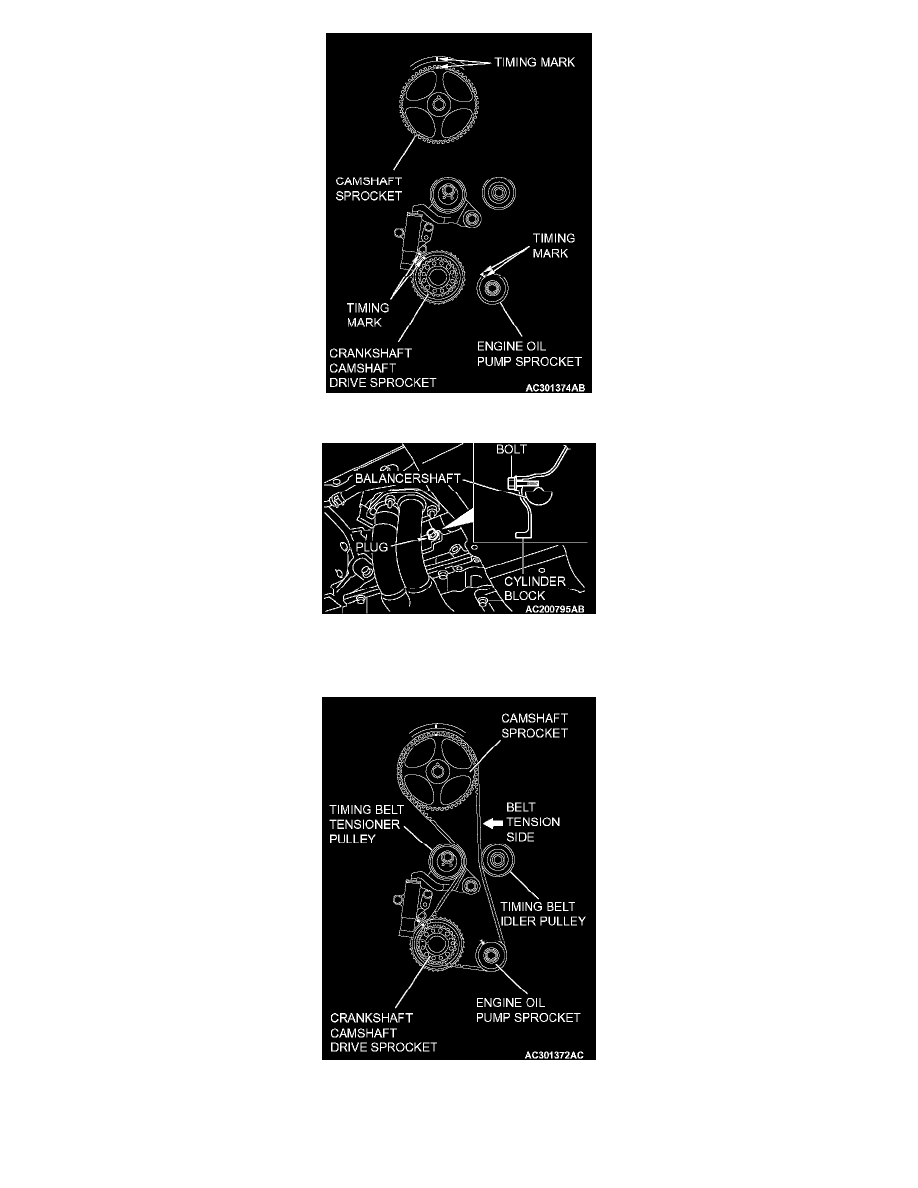
1. Align the timing marks on the camshaft sprocket, crankshaft camshaft drive sprocket and engine oil pump sprocket.
2. Adjust the timing mark of the engine oil pump sprocket. Unplug the cylinder block plug. Insert a bolt (M6, section width 10 mm, nominal
length 45 mm) from the plug hole. If the bolt comes in contact with the balancer shaft, turn the engine oil sprocket one rotation. Re-adjust the
timing mark and then check to see that the bolt fits. Do not remove the bolt until the valve timing belt is assembled.
3. Incorporate the valve timing belt in the following manner so that the tensile force of the belt is not lax.
1. Place the valve timing belt on the timing belt tensioner pulley and crankshaft camshaft driver sprocket and then support it with your left
hand so it does not slide.
2. Place the valve timing belt on the engine oil pump sprocket while pulling it with the right hand.
Pinch or Ctrl + scroll to zoom. Double-tap to reset.
The same page in: Lancer L4-2.4L SOHC (2005).
Parts & tools for this job For 2005 Mitsubishi Lancer 2.4L
- PARTTiming belt kitSearch: Mitsubishi Lancer 2005 2.4L timing belt kit
- TOOLEngine timing tool setSearch: Mitsubishi engine timing tool set
- TOOLTorque wrenchSearch: 3/8 inch torque wrench
Links open Amazon search results in a new tab. As an Amazon Associate I earn from qualifying purchases.