
Installing
- Make
- SEAT
- Model
- Alhambra
- Year
- 1996–2010
- Section
- Brake systems › Installing
ABS, ADR, TCS, EDL, ESPInstalling
Installing
Connect the speed sensor cable connector (1).
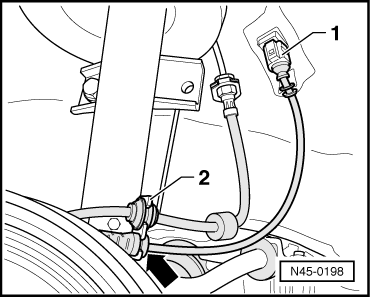
Clip cable (arrow) into bracket (2).
Before inserting speed sensor, clean hole inner surface and coat speed sensor all-round with solid lubricant paste G 000 650.
Insert speed sensor into hole in wheel bearing housing and tighten bolt to 10 Nm.
For vehicles with brake wear indicator, additionally connect the connector (1).
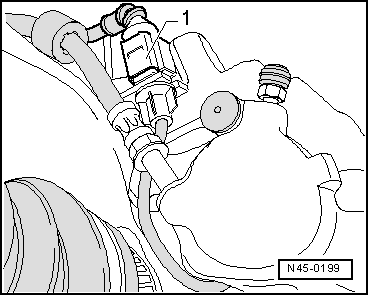
Turn steering fully to left and right-hand lock and check clearance to speed sensor cable.
Parts & tools for this job For 1996 SEAT Alhambra
- PARTBrake padsSearch: SEAT Alhambra 1996 brake pads
- TOOLBrake bleeder kitSearch: one man brake bleeder kit
- FLUIDBrake fluidSearch: brake fluid
As an Amazon Associate we earn from qualifying purchases.