
Removing
- Make
- SEAT
- Model
- Alhambra
- Year
- 1996–2010
- Section
- Brake systems › Removing
Removing
Remove wheels.
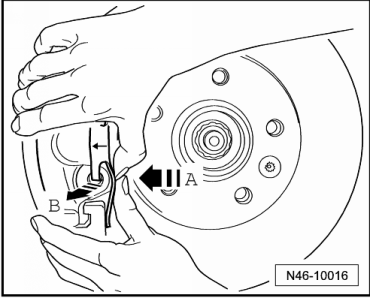
Press retaining spring in (direction of arrow A) until it can be pressed out of hole in (direction of arrow B).
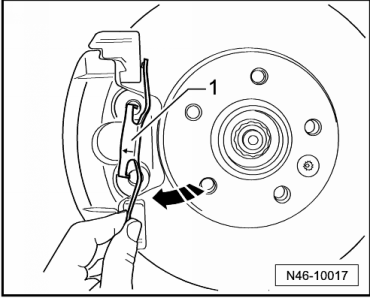
Turn retaining spring (1) clockwise (arrow) until it can be removed from the upper hole.
Separate connector for brake pad wear indicator.
Slightly lift up locating lug on lower part of connector (1) and turn 90°.
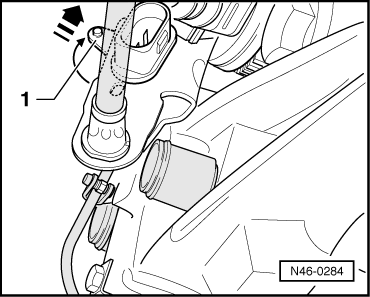
Pull connector lower part out of bracket in direction of arrow.
Remove protective caps.
Unscrew both guide pins (arrows) from brake caliper and remove.
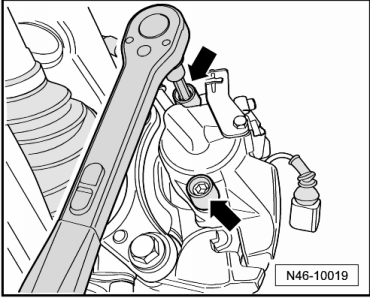
Remove brake caliper housing and secure with wire so that the weight of the brake caliper does not stress or damage the brake hose.
Take brake pad out of brake caliper or from brake carrier.
Warning
Do not use compressed air on brake system, the dust thereby produced is hazardous to health!
Throughly clean brake carrier and contact surfaces for brake pads and remove corrosion.
Clean brake caliper.
Parts & tools for this job For 1996 SEAT Alhambra
- PARTBrake padsSearch: SEAT Alhambra 1996 brake pads
- TOOLBrake bleeder kitSearch: one man brake bleeder kit
- FLUIDBrake fluidSearch: brake fluid
As an Amazon Associate we earn from qualifying purchases.