
Removing and installing clutch pedal
- Make
- SEAT
- Model
- Alhambra
- Year
- 1996–2010
- Section
- 5-speed manual gearbox 006 › Removing and installing clutch pedal
Removing and installing clutch pedal
Open slave cylinder bleed valve and connect brake filling and bleeding unit V.A.G 1238 B.
Remove cover below dash panel.
=> Repair group 70; removing and installing dash panel 5-speed manual gearbox 006 removing and installing dash panel
Unhook relay plate from both retainers.
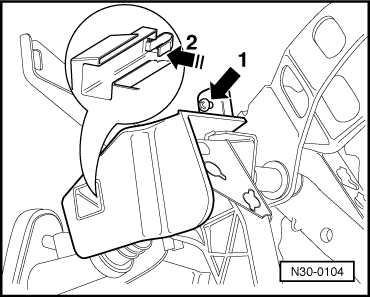
=> Repair group 97 Electrical system 5-speed manual gearbox 006
→ Remove cover for clutch pedal from mounting bracket (arrows -1- and -2-).
Separate clutch pedal from master cylinder => Page 30-14 and push operating rod towards engine compartment onto stop.
Remove clutch pedal securing clip from pivot pin, by lifting tab up with a screwdriver and pushing clip off.
Pull clutch and brake pedal pivot pin out to the right, until the clutch pedal can be removed.
Take out clutch pedal and return spring.
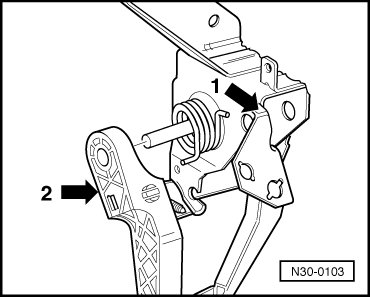
Installation is carried out in the reverse sequence, when doing this note the following:
Installation position of return spring:
→ The angled ends arrest on mounting bracket (arrow -1-) and behind clutch pedal (arrow -2-).
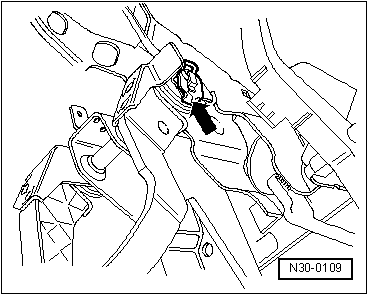
→ Align brake pedal/clutch pedal pivot pin so that the securing clip flat (arrow), on the side of the brake pedal is parallel to pivot pin.
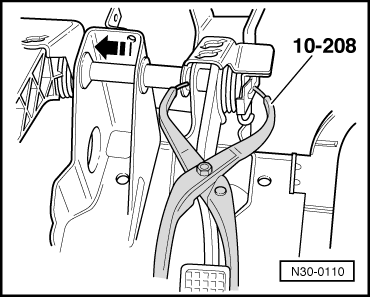
→ Fit securing clip for clutch pedal, to do this push pivot pin towards clutch pedal (direction of arrow).
Engaging clutch pedal with master cylinder operating rod master cylinder => Page 30-17.
Fill brake fluid reservoir with brake fluid to between "max" and "min" markings.
If the fluid level has sunk to below the "min" marking then the clutch system must be bled.
Parts & tools for this job For 1996 SEAT Alhambra
- PARTClutch kitSearch: SEAT Alhambra 1996 clutch kit
- TOOLClutch alignment toolSearch: clutch alignment tool
- FLUIDGear oilSearch: SEAT Alhambra manual gearbox oil
As an Amazon Associate we earn from qualifying purchases.