
Installing
- Make
- SEAT
- Model
- Alhambra
- Year
- 1996–2010
- Section
- 6-speed manual gearbox 02N › Installing
Installing
Carry out installation in the reverse sequence, noting the following:
Align pivot pin for clutch and brake pedals so that flat side (arrow) of securing clip on side of brake pedal is parallel to mounting bracket.
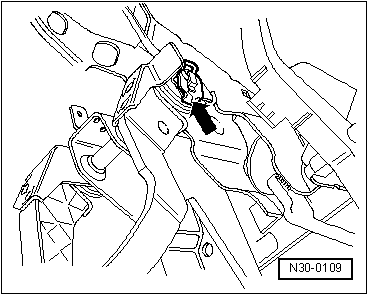
Set clutch pedal on pivot pin for clutch and brake pedal.
Set left securing clip on pivot pin for clutch and brake pedals, pressing pivot pin in direction of clutch pedal (arrow).
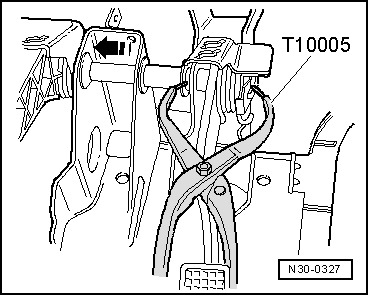
Install over-centre spring Chapter “Removing and installing over-centre spring”.
The retainer (A) must be fitted to the master cylinder operating rod (B).
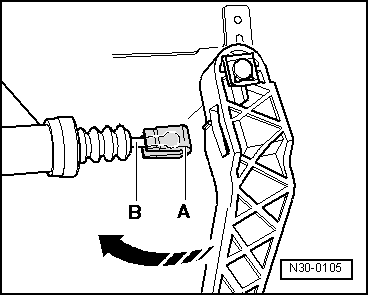
Pull clutch pedal stop sideways off mounting bracket for foot pedal cluster.
Press clutch pedal towards bulkhead (direction of arrow) until it engages, ensuring that it is properly locked.
To ensure that retainer is locked correctly, pull clutch pedal slightly into passenger compartment and push both ends of retainer into clutch pedal using a screwdriver.
Install clutch pedal stop Chapter “Assembly overview - pedal cluster”.
Install clutch pedal switch F36 Item “Assembly overview - pedal cluster”.
Note!
- Observe differing notches in support for clutch pedal switch.
Bolt cover to mounting bracket (arrow 1) and (arrow 2).
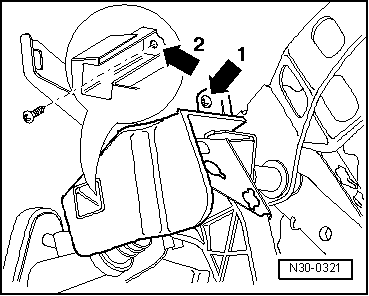
Hook relay plate into both retainers and screw in upper fastener Electrical system Rep. Gr. 97.
Install covers on driver side Compartments, covers and trims; Removing and installing cover on driver side ▸ 5.00.
Remove hose clamp 3094 from supply hose (A).
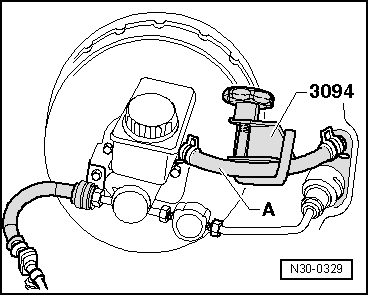
Bleed clutch system Chapter “Bleeding clutch system”.
Parts & tools for this job For 1996 SEAT Alhambra
- PARTClutch kitSearch: SEAT Alhambra 1996 clutch kit
- TOOLClutch alignment toolSearch: clutch alignment tool
- FLUIDGear oilSearch: SEAT Alhambra manual gearbox oil
As an Amazon Associate we earn from qualifying purchases.