
Removing and installing multi-function unit, vehicles 05.00
- Make
- SEAT
- Model
- Alhambra
- Year
- 1996–2010
- Section
- Electrical system › Removing and installing multi-function unit, vehicles 05.00
Removing and installing multi-function unit, vehicles ▸ 05.00
Disconnect battery Chapter “Disconnecting and reconnecting batteries”.
Open cover (1) for multi-function unit, unclip from dash panel and remove.
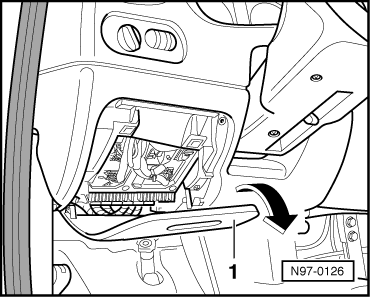
Pull out lower cover (1) for multi-function unit.
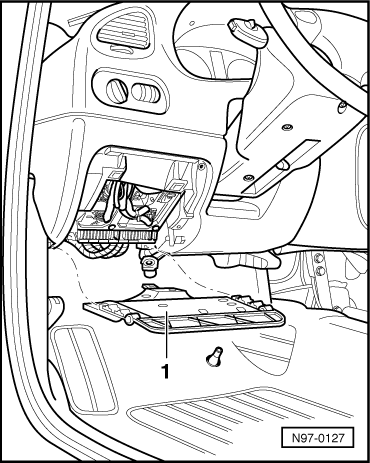
Remove cross-head screws (arrows).
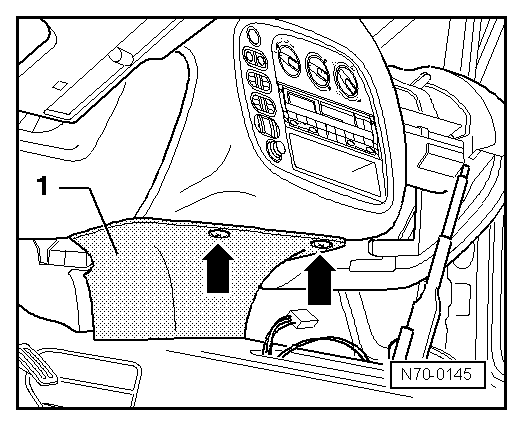
Remove cover (1) (under dash panel).
Remove cross-head screws (arrows).
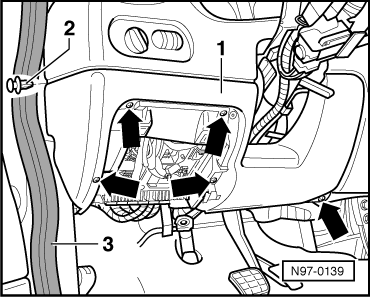
Pull door seal (3) off in vicinity of dash panel.
Lever out clip (2).
Remove driver side cover (1) and pull connector off footwell light.
Release all fasteners of multi-pin connectors to multi-function unit and disconnect connectors.
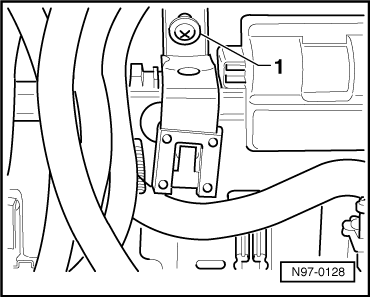
Remove cross-head screw (1) above multi-function unit.
Release securing clips (1) from pins (3) on left and right of multi-function unit and swing upwards.
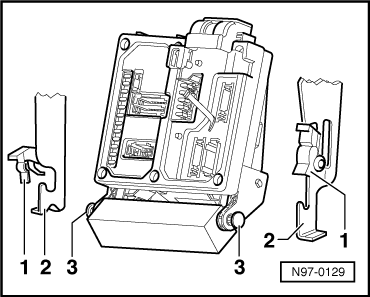
Unhook multi-function unit from retaining arms (2).
Installation is carried out in the reverse sequence.
Parts & tools for this job For 1996 SEAT Alhambra
- TOOLDigital multimeterSearch: automotive digital multimeter
- PARTAssorted fuse kitSearch: car fuse assortment kit
- TOOLWire crimper and connector kitSearch: wire crimper connector kit
As an Amazon Associate we earn from qualifying purchases.