
Removal of the instrument panel
- Make
- SEAT
- Model
- Alhambra
- Year
- 2010–2020
- Section
- Vehicle electrics › Removal of the instrument panel
Instruments, GCIRemoval of the instrument panel
Removal of the instrument panel
Note
- There is no need to remove the steering wheel. However, the following illustrations do not show the steering wheel to facilitate the operations of compression.
Pull the steering wheel with the height adjustment device, pull it right out and secure it in the lowest position.
Remove the combined switch from the steering column (1). To do this, carefully pull it upwards (arrow A) with the lever U 30800.
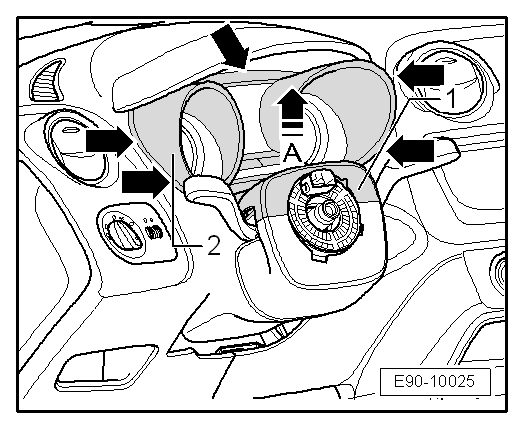
Remove the instrument panel insert (2). Also place the lever U 30800 on the points shown (arrows).
Note
- When removing the dash panel cover be careful not to damage the surface of the dash panel.
Remove the upper cover of the steering column (1), the sun blinds and the dash panel cover (2).
Extract the attachment bolts (arrows) for the gearbox support.
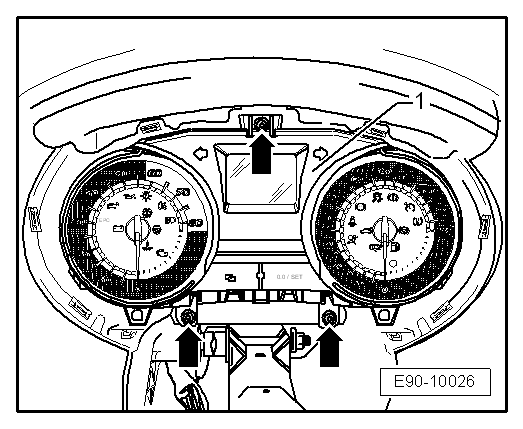
Pull slightly the dash panel towards the interior of the vehicle.
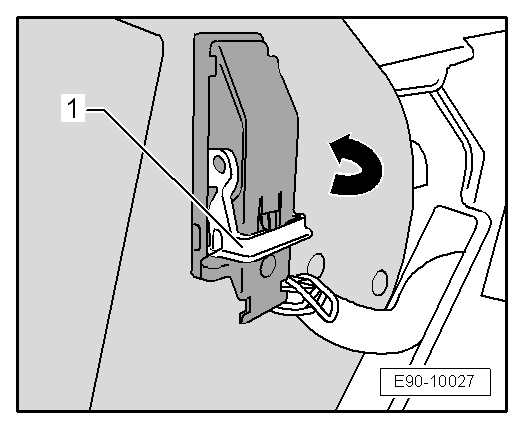
Release the connector (1) in the (direction of the arrow) and separate the connector from the horn.
Parts & tools for this job For 2010 SEAT Alhambra
- TOOLTorque wrenchSearch: 3/8 inch torque wrench
- TOOLSocket setSearch: socket set metric
- BOOKHaynes manualSearch: Haynes manual SEAT Alhambra
As an Amazon Associate we earn from qualifying purchases.