
Removing and installing ignition/starter switch
- Make
- SEAT
- Model
- Exeo
- Year
- 2008–2013
- Section
- Electrical system › Removing and installing ignition/starter switch
Removing and installing ignition/starter switch
Disconnect battery Chapter “Disconnecting and connecting battery in engine compartment”
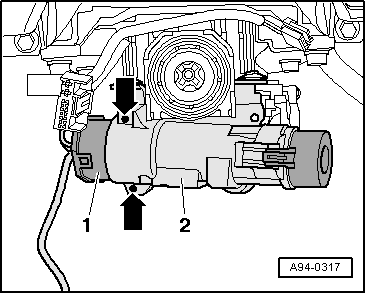
Remove steering column switch module Chapter “Removing and installing steering column switch module (SCSM)”.
Detach electrical connections of the reader coil.
Unplug connector (1) at ignition/starter switch.
Remove the locking compound from the fixing screw (arrow).
Slacken off bolts (arrows) slightly and pull ignition/starter switch out of steering lock housing (2).
Installation is carried out in reverse order, noting the following:
Note
- .
Apply sealing paint to bolts (arrows) at steering lock housing (2).
Install steering column switch module Anchor “Removing and installing steering column switch module (SCSM)”.
Parts & tools for this job For 2008 SEAT Exeo
- TOOLOBD2 scannerSearch: OBD2 scanner
- TOOLDigital multimeterSearch: automotive digital multimeter
- TOOLBack-probe test leadsSearch: back probe test leads
As an Amazon Associate we earn from qualifying purchases.