
Removing and installing intermediate steering shaft
- Make
- SEAT
- Model
- Exeo
- Year
- 2008–2013
- Section
- Running gear, axles, steering › Removing and installing intermediate steering shaft
‹ Prev Removing and installing steering column electronics control unit J500Next › Equivalency table according to usability
SteeringRemoving and installing intermediate steering shaft
Removing and installing intermediate steering shaft
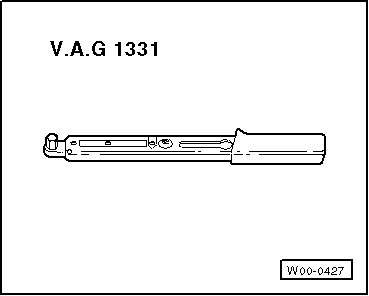
- Torque wrenches V.A.G 1331
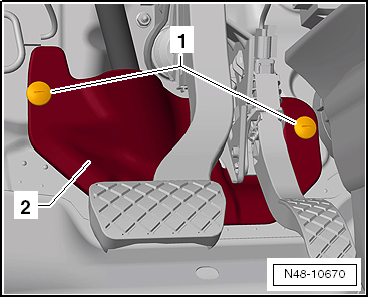
Unscrew bolts (1) and remove footwell trim (2).
Unscrew bolt (arrow) from universal joint (1) and pull off universal joint in (direction of arrow).
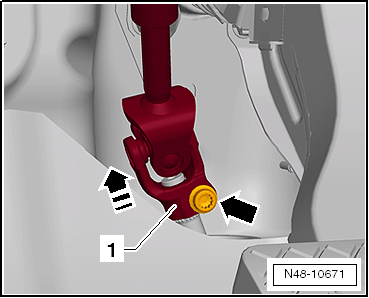
Remove bolt (1).
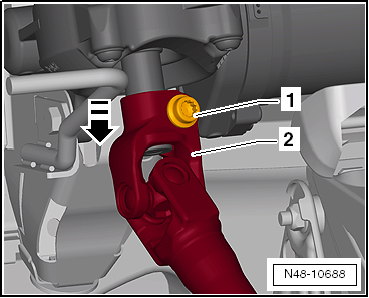
Pull steering column articulated shaft (2) in (direction of arrow) off steering column and remove.
Installation is carried out in reverse order.
| Component | Tightening torque |
|---|---|
| Steering column articulated shaft to steering rack (electric steering column) Use new bolts. | 20 Nm + turn 180° further |
| Steering column articulated shaft to steering column Use new bolts. | 20 Nm + turn 180° further |
‹ Prev Removing and installing steering column electronics control unit J500Next › Equivalency table according to usability
Parts & tools for this job For 2008 SEAT Exeo
- TOOLTie rod end toolSearch: tie rod end puller
- TOOLBall joint separatorSearch: ball joint separator
- FLUIDPower steering fluidSearch: SEAT power steering fluid
As an Amazon Associate we earn from qualifying purchases.