
Removing and installing windscreen wiper arm
- Make
- SEAT
- Model
- Exeo
- Year
- 2008–2013
- Section
- Electrical system › Removing and installing windscreen wiper arm
Removing and installing windscreen wiper arm
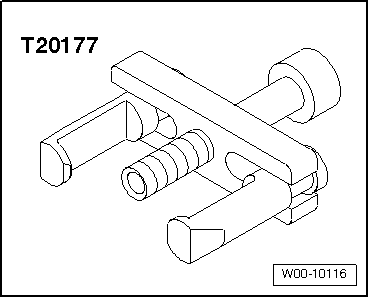
- Extractor T20177
Switch on ignition.
Actuate “rear window wiper” and allow wiper arm to move to end position.
Switch off ignition and all electrical consumers and take out ignition key.
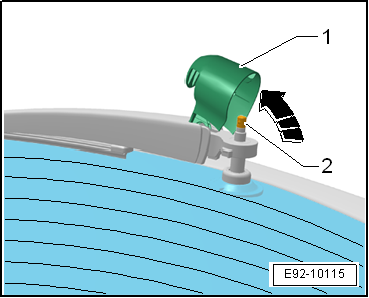
Raise the cap (1) (arrow).
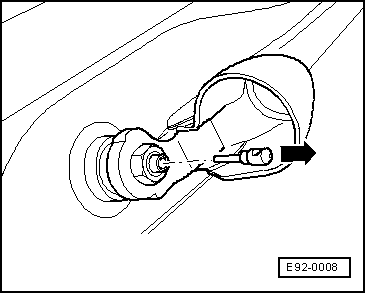
Carefully pull out the jet (in the direction of the arrow), using suitable tweezers.
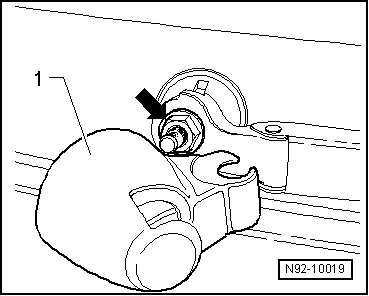
Loosen the hexagonal nut by turning a few times (arrow), but do not remove completely.
Slide arms of the extractor T20177 under wiper arm, as shown in the illustration.
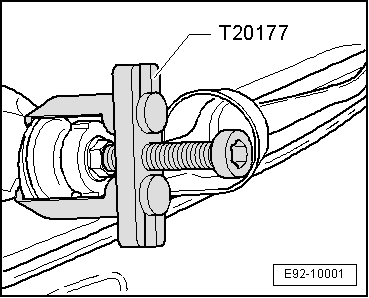
Rotate tightening bolt of the extractor T20177 clockwise until it makes contact with wiper arm shaft. The previously slackened hexagonal nut serves to centre and guide the tightening bolt.
Rotate the tightening bolt of the extractor T20177 with a 6 mm hexagonal wrench clockwise until the point where the wiper arm detaches from the shaft.
Installation is carried out in reverse order, noting the following:
Set the windscreen wiper arms Chapter “Adjusting windscreen wiper arm”.
Parts & tools for this job For 2008 SEAT Exeo
- PARTWiper bladesSearch: SEAT Exeo 2008 wiper blades
- PARTWasher pumpSearch: SEAT Exeo 2008 washer pump
As an Amazon Associate we earn from qualifying purchases.