
Removing and installing additional brake light
- Make
- SEAT
- Model
- Ibiza / Córdoba / Vario
- Year
- 6K, 1993–2002
- Section
- Electrical system › Removing and installing additional brake light
‹ Prev Additional brake lightsNext › Lamp for highly composite brake light M25: remove and install -Exeo ST
Lights, lamps, switches outsideRemoving and installing additional brake light
Removing and installing additional brake light
Switch off ignition and all electrical consumers and take out ignition key.
Note
- High-level brake light is accessible from luggage compartment through opening beneath rear shelf.
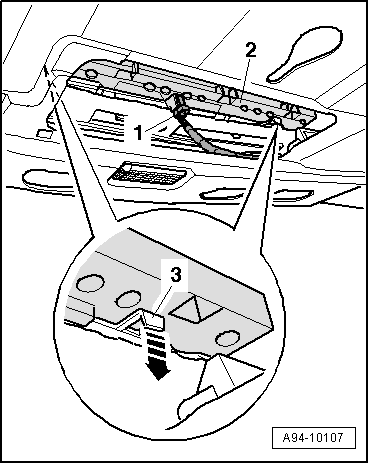
Unplug electrical connector (1) at high-level brake light (2).
Release retaining clips (3) in direction of (arrow).
Pull high-level brake light downwards out of opening.
Installation is carried out in reverse order, noting the following:
Note
- Entire centre brake light must be replaced in the event of defective LEDs.
‹ Prev Additional brake lightsNext › Lamp for highly composite brake light M25: remove and install -Exeo ST
Parts & tools for this job For 1993 SEAT Ibiza
- PARTBrake padsSearch: SEAT Ibiza 1993 brake pads
- TOOLBrake bleeder kitSearch: one man brake bleeder kit
- FLUIDBrake fluidSearch: brake fluid
As an Amazon Associate we earn from qualifying purchases.