
Removing and installing bulkhead
- Make
- SEAT
- Model
- Leon León
- Year
- 5F, 2012–2020
- Section
- General body repairs, exterior › Removing and installing bulkhead
Body frontRemoving and installing bulkhead
Removing and installing bulkhead
- Torque wrench V.A.G 1331
- Lever 3409
Lift the front bonnet. Use the rod to keep it open.
Remove the grille below the windscreen Chapter “Grille below windscreen - disassembly and assembly”.
Remove the fixing rings (1) of the noise insulation of the plenum chamber cover.
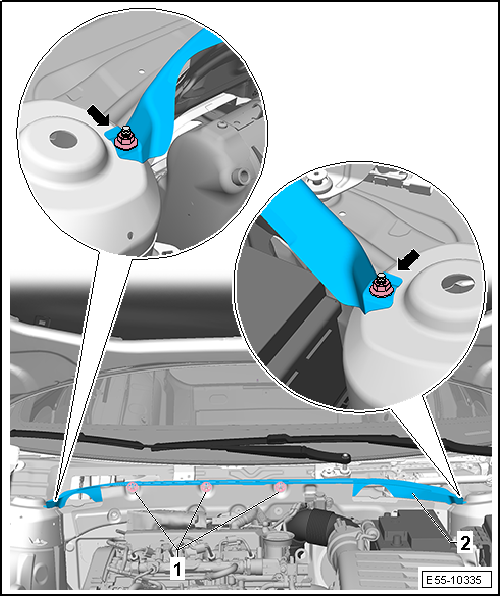
Remove the nuts (arrows) on both sides.
To remove the plenum chamber cover, pull upwards in order to release it from the fixing tabs on the body.
Fit in reverse order from removal, remembering the following:
Note
- (2) is damage, replace it.
Engage the plenum chamber cover (3) in the retaining tabs (4) of the plenum chamber (1).
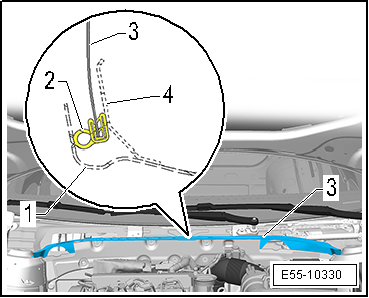
- Chapter “Assembly overview - bonnet”
Parts & tools for this job For 2012 SEAT Leon
- TOOLTrim removal tool kitSearch: trim removal tool kit
- PARTTouch-up paintSearch: SEAT touch up paint
- PARTPanel clip assortmentSearch: SEAT panel clips assortment
As an Amazon Associate we earn from qualifying purchases.