
Removing and installing brake pedal
- Make
- SEAT
- Model
- Leon León
- Year
- 5F, 2012–2020
- Section
- Brake system: › Removing and installing brake pedal
Removing and installing brake pedal
Note
- It is not possible to remove the brake pedal individually.
- Remove the pedal cluster/ mounting bracket assembly first.
Removing the support stand Chapter “Removing and installing mounting bracket”.
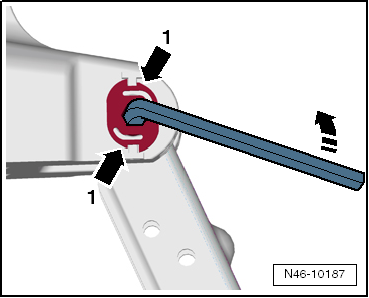
Turn threaded fastener on pivot pin anti-clockwise in direction indicated by (arrow).
Note
- (arrow 1) break in the process. Renew pivot pin.
Pull out pivot pin from right side.
Take brake pedal out of mounting bracket.
Note
- Renew pivot pin and threaded fastener.
Warning
Do not lubricate or grease pivot pin. Pivot pin must remain dry.
Both bearing bushes must be fitted in the brake pedal bearing so that the pedal is secure in the mounting bracket.
Slide pivot pin from right to left through pedal bracket and brake pedal.
Push the new bearing axle from the left to the right through the bearing block and brake pedal.
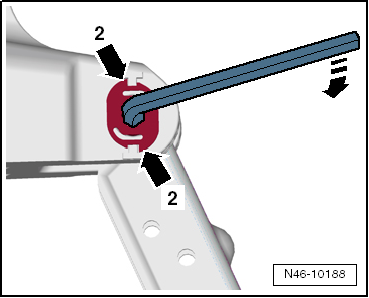
Turn the screw on the bearing axle clockwise (movement arrow), until the tabs (arrow 2) located audibly in their limit position in the bearing block.
Installing the bearing block Chapter “Removing and installing mounting bracket”.
Warning
Make sure that the brakes work properly before the vehicle is driven on the road.
Parts & tools for this job For 2012 SEAT Leon
- PARTBrake padsSearch: SEAT Leon 2012 brake pads
- TOOLBrake bleeder kitSearch: one man brake bleeder kit
- FLUIDBrake fluidSearch: brake fluid
As an Amazon Associate we earn from qualifying purchases.