
Removing and installing lock carrier cover
- Make
- SEAT
- Model
- Leon León
- Year
- 5F, 2012–2020
- Section
- General body repairs, exterior › Removing and installing lock carrier cover
‹ Prev Removing and installing attachmentsNext › Replace the sensor holder for the front steering parking aid
BumperRemoving and installing lock carrier cover
Removing and installing lock carrier cover
- Lever 3409
Lift the front bonnet. Use the rod to keep it open.
Remove cover of the lock carrier (2); for this purpose use a flange screwdriver; turn the rivet heads (1) by 90° to the left and then pull them out with the lever 3409.
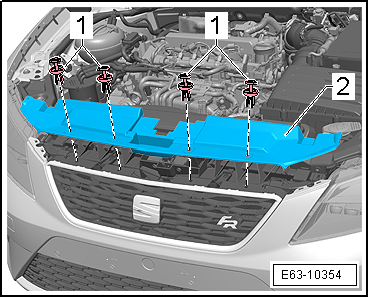
Remove the cover of the lock carrier (2).
Install in reverse order of removal.
‹ Prev Removing and installing attachmentsNext › Replace the sensor holder for the front steering parking aid
Parts & tools for this job For 2012 SEAT Leon
- TOOLTrim removal tool kitSearch: trim removal tool kit
- PARTTouch-up paintSearch: SEAT touch up paint
- PARTPanel clip assortmentSearch: SEAT panel clips assortment
As an Amazon Associate we earn from qualifying purchases.