
Removing and installing dipped beam bulb
- Make
- SEAT
- Model
- Leon León
- Year
- 5F, 2012–2020
- Section
- Electrical system › Removing and installing dipped beam bulb
‹ Prev Installing and removing servomotor for headlight range adjustment V48 / V49, LED headlightsNext › Removing and installing dipped beam bulb M30 / M32
Lights, lamps, switches outsideRemoving and installing dipped beam bulb
Removing and installing dipped beam bulb
Note
- The illustrations show how to change the dipped beam bulb of the left headlight. The dipped-beam bulb in the right-hand headlamp is replaced in the same way.
- The headlight does not have to be removed.
Switch off ignition and all electrical consumers and take out ignition key.
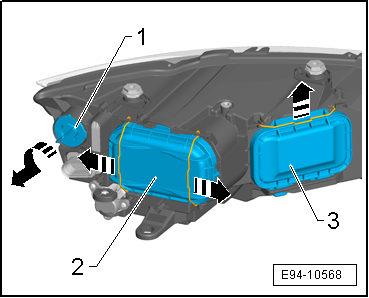
Separate the headlight cover (2).
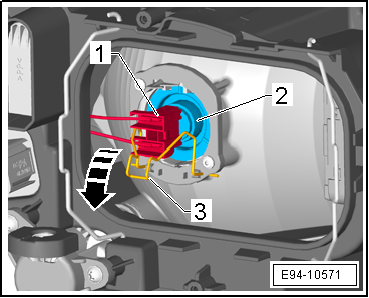
Separate the connector (1) from the left headlight dipped beam bulb M29.
Press on the spring-loaded bar of the bulb and push to the right (arrow).
Hold the bulb at the rear and remove pull out of the headlight.
Note
- Never allow bulb glass to come into contact with hands.
- When installing, make sure that the lugs of the lamp are fitted correctly to the headlight mount.
‹ Prev Installing and removing servomotor for headlight range adjustment V48 / V49, LED headlightsNext › Removing and installing dipped beam bulb M30 / M32
Parts & tools for this job For 2012 SEAT Leon
- PARTReplacement bulbsSearch: SEAT Leon 2012 bulbs
- TOOLDigital multimeterSearch: automotive digital multimeter
As an Amazon Associate we earn from qualifying purchases.