
Removing and installing steering column electronics control unit J500
- Make
- SEAT
- Model
- Leon León
- Year
- 5F, 2012–2020
- Section
- Running gear, axles, steering › Removing and installing steering column electronics control unit J500
Removing and installing steering column electronics control unit J500
- Torque wrenches V.A.G 1410
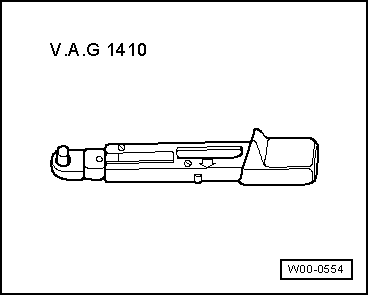
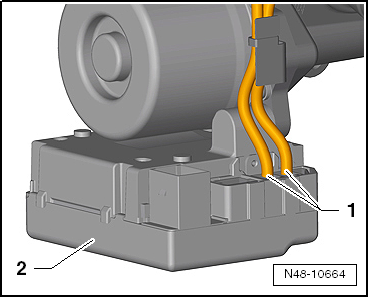
Remove steering column Chapter “Steering column: removing and fitting”.
Disconnect the connectors (1) of the power steering control unit J500 (2).
Lever off cap (1).
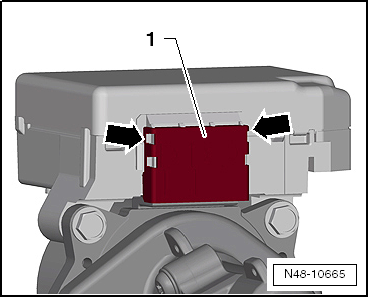
Unscrew bolts (1).
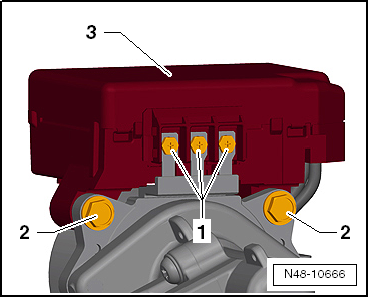
Unscrew bolt (2) and detach power steering control unit J500 (3).
Note
- power steering control unit J500, do not put the steering column on the contacts (arrows).
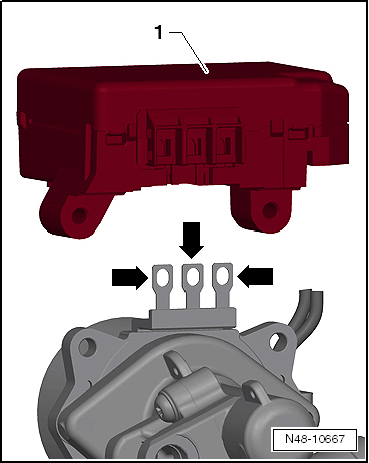
- This will damage the contacts and the steering column will have to be renewed completely.
Place the power steering control unit J500 (1) correctly onto the contacts (arrows).
Screw in bolts (1)
Screw in bolts (2) and tighten to specified torque.
Tighten bolts (1) to specified torque.
Fit and engage new cap (1) (arrows).
Install steering column Chapter “Steering column: removing and fitting”.
Steering column electronics control unit needs to be readapted every time after the steering column has been renewed or reinstalled after removal Vehicle diagnostic tester.
| Component | Tightening torque |
|---|---|
| Power steering control unit J500 on the bracket | 20 Nm |
| Contact on the power steering control unit J500 | 4 Nm |
Parts & tools for this job For 2012 SEAT Leon
- TOOLTie rod end toolSearch: tie rod end puller
- TOOLBall joint separatorSearch: ball joint separator
- FLUIDPower steering fluidSearch: SEAT power steering fluid
As an Amazon Associate we earn from qualifying purchases.