
Removing and installing brake pedal
- Make
- SEAT
- Model
- Toledo
- Year
- 5P, 2004–2009
- Section
- Brake system › Removing and installing brake pedal
Removing and installing brake pedal
- Torque wrench V.A.G 1331
Note
- Before disconnecting the battery, consult the customer regarding the anti-theft code provided with the radio.
- If the battery is reconnected check the vehicle equipment (radio, clock, electric comfort system, etc.), following the indications in the Workshop Manual and/or the Operating Instructions.
Warning
Before working on the electrical system, disconnect the battery earth strap.
Disconnect battery.
Remove the cover in the footwell of the driver's side Bodywork, interior fitting work.
Remove the footwell vent on the driver's side Heating servicing; dash panel vent on one side and in the middle: remove and install.
Remove the comfort system central control unit J393 and the support housing Electrical system Rep. gr. 97.
Removing the brake light switch F Chapter “Removing, installing and adjusting the brake light switch F and brake pedal switch F47”.
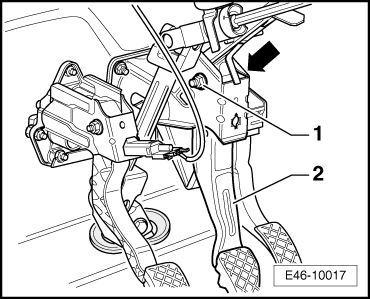
Separate the brake pedal from the servo brake Chapter “Separating brake pedal from brake servo”.
Remove the hexagonal nut (1) for the brake pedal bolt.
Remove the hexagonal bolt for the support pin (arrow).
Removing the brake pedal (2).
Install in reverse order of removal operations.
Note
- (2) is situated in front of the housing. Bolt for the support bolt of the brake pedal should be fitted via the opening above the support.
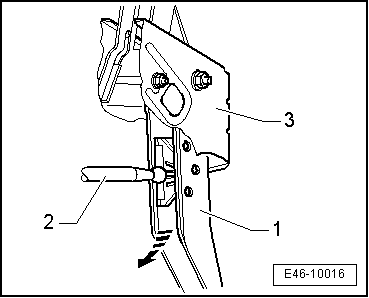
Grease the brake pedal support surfaces with polycarbamide grease Parts catalogue.
Installing and adjusting the brake light switch F Chapter “Removing, installing and adjusting the brake light switch F and brake pedal switch F47”.
Connect battery.
Carry out automatic verification Vehicle diagnostic tester.
Parts & tools for this job For 2004 SEAT Toledo
- PARTBrake padsSearch: SEAT Toledo 2004 brake pads
- TOOLBrake bleeder kitSearch: one man brake bleeder kit
- FLUIDBrake fluidSearch: brake fluid
As an Amazon Associate we earn from qualifying purchases.