
Removing and installing brake carrier
- Make
- Volkswagen
- Model
- Amarok 2H
- Year
- 2010–2020
- Section
- Rear brakes › Removing and installing brake carrier
Brake systemsRemoving and installing brake carrier
Removing and installing brake carrier
Resetting brake and removing brake drum → Chapter.
Remove brake shoes → Chapter.
Remove wheel brake cylinder → Chapter.
Remove rear axle shaft Running gear, axles, steeringRep. gr.42Rear axle shafts.
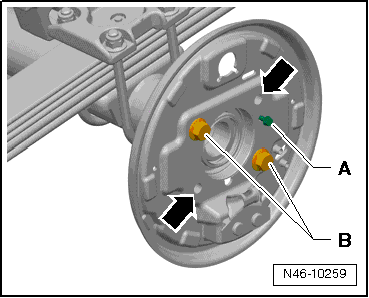
Remove bolt (A) and take brake carrier off axle beam.
Installation is performed in reverse sequence; note the following:
Note
- Before installing brake carrier, clean threaded hole for bolt (A) in axle beam.
- Threaded holes into which self-locking bolts or bolts with locking fluid have been screwed must be cleaned (e.g. using a thread chaser). Otherwise, there is a risk that bolts will shear off when removed once again.
- Insert 2 securing bolts (B) for rear axle shaft so that holes (arrows) of brake carrier are centred on axle beam.
Tighten new bolt (A).
Bleed brake system → Chapter.
- Assembly overview - rear brakes → Chapter
- Rear axle shafts; Assembly overview - rear axle shafts Running gear, axles, steeringRep. gr.42Assembly overview - rear axle shafts.
Parts & tools for this job For 2010 Volkswagen Amarok
- PARTBrake padsSearch: Volkswagen Amarok 2010 brake pads
- TOOLBrake bleeder kitSearch: one man brake bleeder kit
- FLUIDBrake fluidSearch: brake fluid
As an Amazon Associate we earn from qualifying purchases.