
Removing and installing chip card reader control unit
- Make
- Volkswagen
- Model
- Beetle A5
- Year
- 2011–2019
- Section
- Navigation system › Removing and installing chip card reader control unit
‹ Prev Removing and installing control unit for navigation system, Discover MediaNext › Removing and installing control unit for vehicle location system
Electrical: CommunicationRemoving and installing chip card reader control unit
Removing and installing chip card reader control unit
Fitting location of chip card reader control unit J676, ETC card reader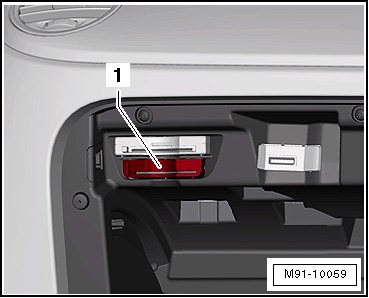
The chip card reader control unit J676(1) is located in the glove compartment.
Switch off ignition and all electrical loads, and pull out ignition key.
The chip card reader control unit J676(1) is either glued to the TV card reader R204 or directly to the glove compartment lining at the top.
Open glove compartment.
Remove chip card.
Detach the chip card reader control unit J676 using a small screwdriver.
Plug connectors into chip card reader control unit J676.
Remove film covering the adhesive surface of the chip card reader control unit J676.
Press chip card reader control unit J676 onto the adhesive surface in the glove compartment/on the TV card reader R204.
‹ Prev Removing and installing control unit for navigation system, Discover MediaNext › Removing and installing control unit for vehicle location system
Parts & tools for this job For 2011 Volkswagen Beetle
- TOOLDigital multimeterSearch: automotive digital multimeter
- PARTAssorted fuse kitSearch: car fuse assortment kit
- TOOLWire crimper and connector kitSearch: wire crimper connector kit
As an Amazon Associate we earn from qualifying purchases.