
Removing and installing iPhone holder
- Make
- Volkswagen
- Model
- Beetle A5
- Year
- 2011–2019
- Section
- Telephone system › Removing and installing iPhone holder
Removing and installing iPhone holder
The iPhone holder comprises a holder element and a storage compartment for the iPhone.
The iPhone holder is connected to the multimedia system control unit J650 in the glove compartment.
Switch off ignition and all electrical consumers, and remove ignition key.
Remove iPhone holder and adapter cable for iPhone holder General body repairs, interiorRep. gr.70Dash panel; Removing and installing iPhone holder.
Removing contact plate for iPhone holder
Unscrew bolts (2), and pull contact plate (3) together with remaining adapter cable upwards out of dash panel (1).
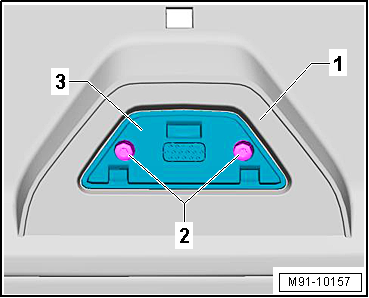
Install in reverse order of removal. Observe the following when doing this:
Make sure to route the adapter cable in its original position General body repairs, interiorRep. gr.70Dash panel; Removing and installing storage compartment for iPhone.
Overview of fitting locations – adapter cable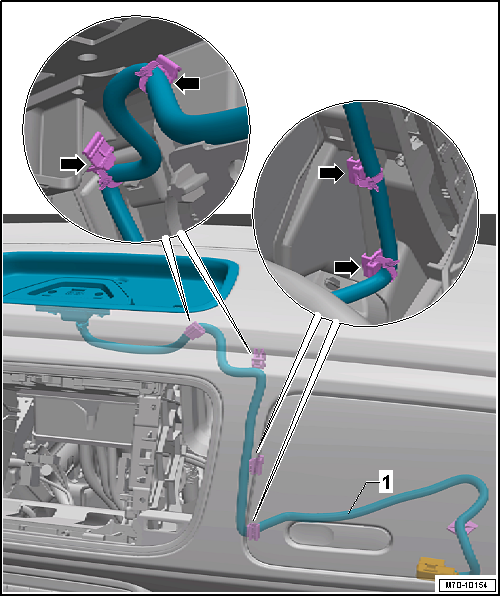
After having installed the adapter cable and the glove compartment, reconnect connector (1).
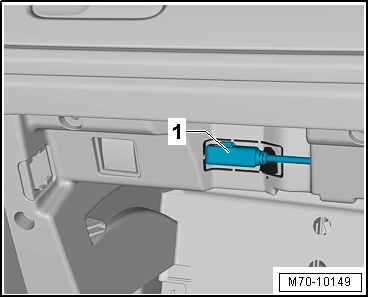
- Bolts, contact plate: 2 Nm
Parts & tools for this job For 2011 Volkswagen Beetle
- TOOLDigital multimeterSearch: automotive digital multimeter
- PARTAssorted fuse kitSearch: car fuse assortment kit
- TOOLWire crimper and connector kitSearch: wire crimper connector kit
As an Amazon Associate we earn from qualifying purchases.