
Removing and installing dash panel insert
- Make
- Volkswagen
- Model
- Caddy Mk2
- Year
- 1996–2004
- Section
- Dash panel insert › Removing and installing dash panel insert
Removing and installing dash panel insert
Warning Before working on the electrical system disconnect the battery earth strap.
Note
- If the vehicle has a security-coded radio, obtain the correct anti-theft code number before disconnecting the battery.
Removing steering wheel Running gearRep. Gr.48Assembly overview: Steering column, column tube, steering wheel and steering wheel with airbag.
Carefully lever out bolt cover (1) using a screwdriver.
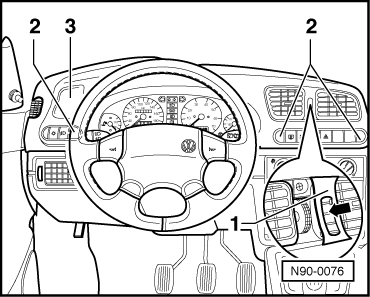
Manually remove bolt covers (2) (do not use a screwdriver).
Carefully lever out trim panel (3) using a screwdriver.
Unscrew bolts (arrows) from dash panel insert cover.
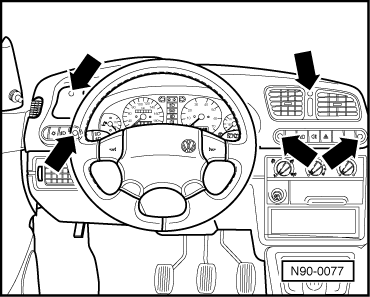
Removing steering column trim → Fig..
Disconnect speedometer cable from manual gearbox.
Pull out dash panel insert cover (1) with dash panel insert (2) as far as possible and pull multi-point connectors from switches.
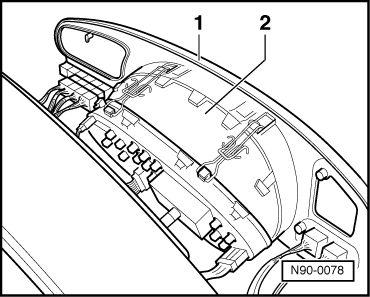
Pull off multi-point connector at rear of dash panel insert by pressing both lugs together.
Press link on speedometer cable connection (arrows) together and pull speedometer cable out of speedometer.
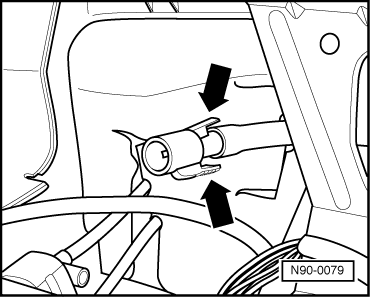
Remove dash panel insert cover with dash panel insert.
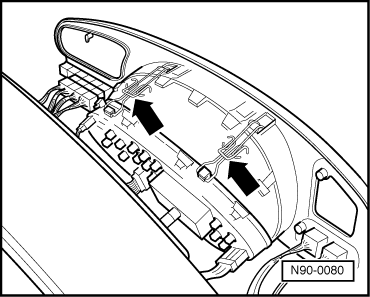
Loosen securing clips (arrows) and remove dash panel insert.
Installation is carried out in the reverse sequence.
Parts & tools for this job For 1996 Volkswagen Caddy
- TOOLDigital multimeterSearch: automotive digital multimeter
- PARTAssorted fuse kitSearch: car fuse assortment kit
- TOOLWire crimper and connector kitSearch: wire crimper connector kit
As an Amazon Associate we earn from qualifying purchases.