
Removing and installing data bus diagnostic interface J533
- Make
- Volkswagen
- Model
- Caddy Mk4
- Year
- 2015–2020
- Section
- Control units › Removing and installing data bus diagnostic interface J533
‹ Prev Removing and installing onboard supply control unit J519Next › Removing and installing special vehicle control unit J608
Electrical systemRemoving and installing data bus diagnostic interface J533
Removing and installing data bus diagnostic interface J533
Note
- If the control unit is replaced, select the Replace function of the respective control unit in Guided fault findingVehicle diagnostic tester.
- The following illustrations show removal on a LHD vehicle. Removal and installation of the onboard supply control unit on a right-hand drive vehicle is carried out in a similar manner.
Switch off ignition and all electrical loads, and pull out ignition key.
Remove cover in driver side footwell General body repairs, interiorRep. gr.68Storage compartments/covers; Overview of fitting locations - storage compartments/covers.
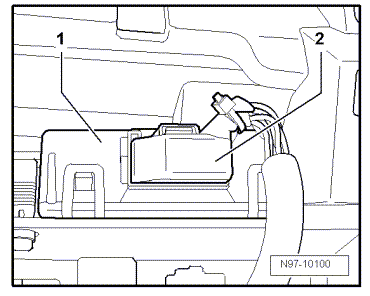
Release connector (2) and pull it off data bus diagnostic interface J533(1).
Press together (arrows) securing pins (1) and push them upwards out of holes.
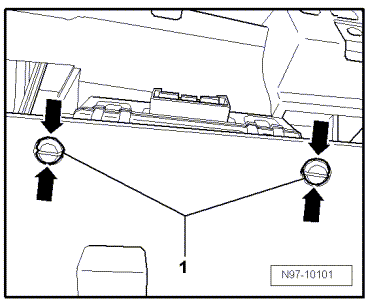
Remove data bus diagnostic interface J533 from bracket.
Installation is carried out in reverse order of removal.
‹ Prev Removing and installing onboard supply control unit J519Next › Removing and installing special vehicle control unit J608
Parts & tools for this job For 2015 Volkswagen Caddy
- TOOLOBD2 scannerSearch: OBD2 scanner
- TOOLDigital multimeterSearch: automotive digital multimeter
- TOOLBack-probe test leadsSearch: back probe test leads
As an Amazon Associate we earn from qualifying purchases.