
Removing and installing handle
- Make
- Volkswagen
- Model
- CC Passat CC and CC
- Year
- 2008–2016
- Section
- Selector mechanism › Removing and installing handle
‹ Prev Removing and installing selector lever handleNext › Moving pushbutton to installation position in the handle
6-speed automatic gearbox 09MRemoving and installing handle
Removing and installing handle
Handle is removed together with selector cover.
Shift selector lever to position „D“.
The pushbutton (arrow) does not need to be pulled out by hand. Pushbutton engages automatically in installation position when handle is pulled off.
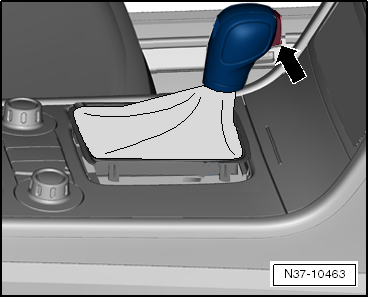
Unclip cover.
Push plastic part under handle in (direction of arrow) in order to unlock handle.
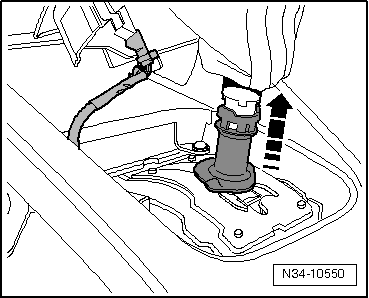
Pull connector from cover.
Pull handle off selector lever without pressing pushbutton.
Note
- Do not press button again after removal as it will no longer be possible to install the handle.
Install in the reverse order of removal, observing the following:
Selector lever is in position „D“.Note
- It is possible for the pushbutton in the handle to be pressed. Never install a handle with the pushbutton pressed in.
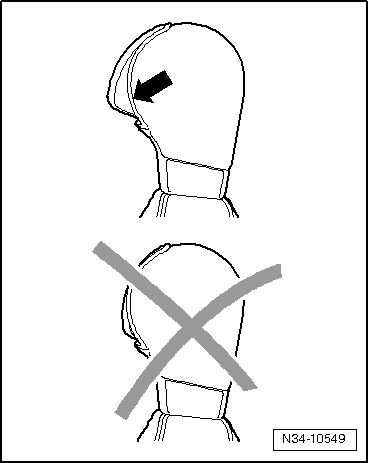
- Move pushbutton to installation position → Chapter.
- New handle is supplied with installation guard. Do not remove guard until just before installing. To remove, pull out in direction of (arrow).
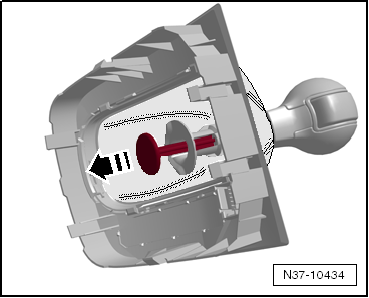
Push handle fully onto selector lever and lock.
Push sleeve downwards to lock.
Push pushbutton after installing it.
Note
- If not installed correctly, pushbutton remains inserted in handle after being pressed. If this happens, remove handle again and move pushbutton to installation position again → Chapter. Then, reinstall handle.
‹ Prev Removing and installing selector lever handleNext › Moving pushbutton to installation position in the handle
Parts & tools for this job For 2008 Volkswagen CC
- PARTTransmission filter kitSearch: Volkswagen CC 2008 transmission filter kit
- FLUIDAutomatic transmission fluidSearch: Volkswagen automatic transmission fluid
- TOOLFluid transfer pumpSearch: fluid transfer pump
As an Amazon Associate we earn from qualifying purchases.