
Removing and installing CD changer R41
- Make
- Volkswagen
- Model
- CC Passat CC and CC
- Year
- 2008–2016
- Section
- CD changer R41 › Removing and installing CD changer R41
Removing and installing CD changer R41
Special tools and workshop equipment requiredRadio release tool 3316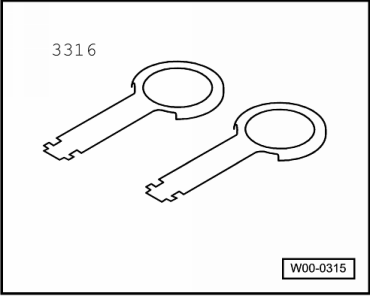
Switch off ignition and all electrical consumers.
Remove any CDs left in the CD changer Operating manual.
Remove glove compartment on front passenger side General body repairs, interiorRep. gr.68Interior equipment; Compartments, covers and trims; Removing glove compartment on front passenger side.
Remove glove compartment with installed CD changer from dash panel.
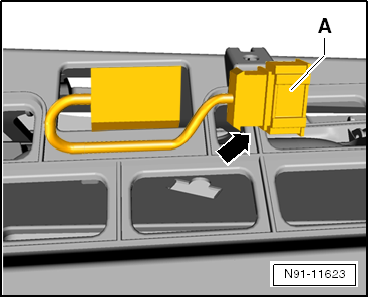
Separate connector (A) on glove compartment by opening cable tie (arrow).
Pull tab (A) and CD changer will move downwards.
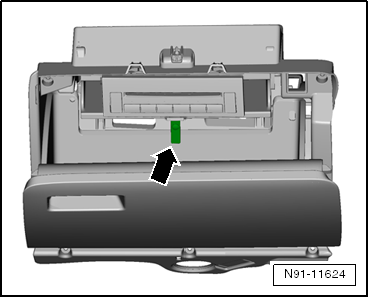
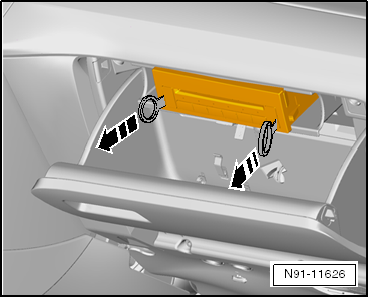
Push radio release tools 3316 into the intended slots on left and right of CD changer (arrows) until they engage audibly.
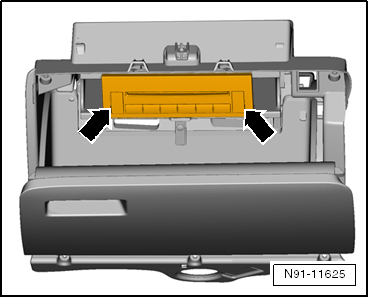
Use release tool to pull DVD changer out of the mounting frame in (direction of arrow).
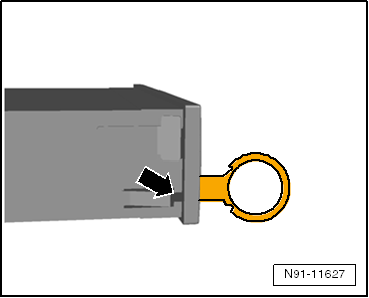
Press the locking tabs (arrow) and pull release tool out of unit.
Unclip connector housing of wiring connection on CD changer.
Insert CD changer in installation frame of glove compartment and, when doing this, push wiring connection upwards through opening in glove compartment.
Now push CD changer further until it engages audibly.
Secure connector (A) on top of glove compartment with new cable tie (arrow). When doing this, ensure that no flapping noises can occur. Cut off excess from cable tie.
Reconnect connector.
Install glove compartment.
Parts & tools for this job For 2008 Volkswagen CC
- TOOLDigital multimeterSearch: automotive digital multimeter
- PARTAssorted fuse kitSearch: car fuse assortment kit
- TOOLWire crimper and connector kitSearch: wire crimper connector kit
As an Amazon Associate we earn from qualifying purchases.