
Removing and installing brake drums and shoes
- Make
- Volkswagen
- Model
- Citi Golf South Africa
- Year
- 1984–2009
- Section
- Front brakes › Removing and installing brake drums and shoes
Removing and installing brake drums and shoes
Special tools and workshop equipment requiredHub cap puller VW 637/2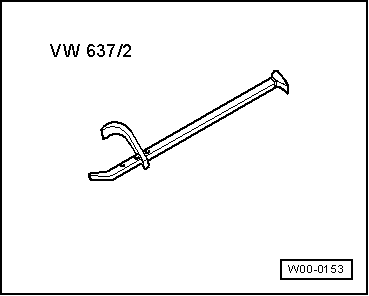
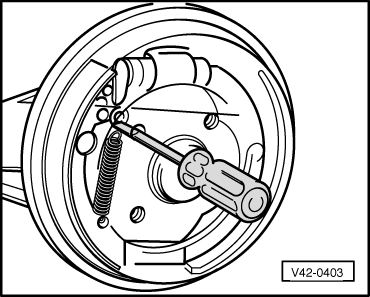
Back shoes off if necessary. To do this, remove a wheel bolt on each side and push wedge up with a screwdriver inserted through bolt hole.
Remove dust cap with hub cap puller VW 637/2.
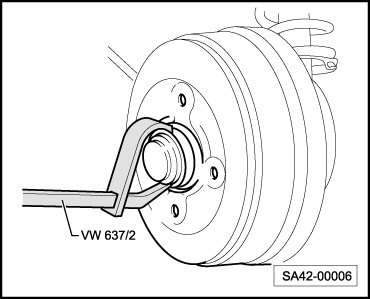
Remove wheel bearing nut.
Remove brake drum.
Remove washers (arrows) from shoe retaining springs with pliers.
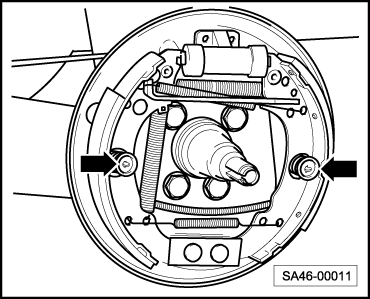
Lift shoes out of bottom support by hand and take lower return spring off.
Disconnect handbrake cable from lever.
Unhook wedge spring and upper return spring with pliers.
Take shoes off.
Clamp shoe with push rod in vice and unhook locating spring.
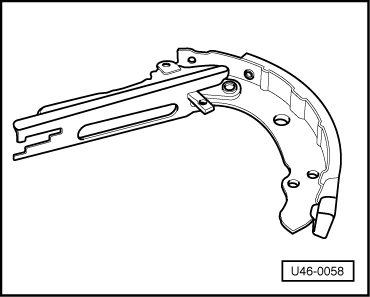
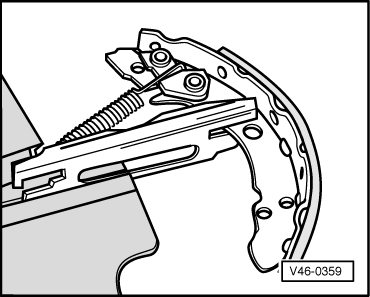
Connect locating spring and place shoe on push rod.
Insert wedge (lug goes towards backplate).
Install shoe with lever in push rod.
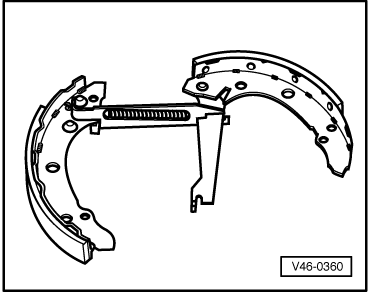
Connect upper return spring.
Hook handbrake cable on lever.
Place shoes on cylinder pistons.
Connect lower return spring and lift shoes on to lower support.
Connect wedge spring.
Install shoe retaining springs and washers.
Install drums and adjust wheel bearings freeplay.
Depress brake pedal firmly once to set the rear brake shoes.
Parts & tools for this job For 1984 Volkswagen Citi Golf
- PARTBrake padsSearch: Volkswagen Citi Golf 1984 brake pads
- TOOLBrake bleeder kitSearch: one man brake bleeder kit
- FLUIDBrake fluidSearch: brake fluid
As an Amazon Associate we earn from qualifying purchases.