
Zeroing service interval display
- Make
- Volkswagen
- Model
- Citi Golf South Africa
- Year
- 1984–2009
- Section
- Dash panel instrument cluster › Zeroing service interval display
Electrical system, 2004»Zeroing service interval display
Zeroing service interval display
With ignition switched on, press and hold the button (arrow A) below the speedometer.
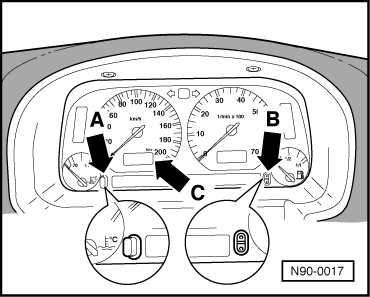
Switch off ignition and release button. The word OEL can be seen in the display (arrow C).
Press the digital clock lower button (arrow B) until, five dashes (- - - - -) appear. Only then is the service reset.
By again pressing the button (arrow A) below the speedometer the other service types will be displayed and can be reset individually.
Switch on ignition and after IN 00 appears switch off again.
Parts & tools for this job For 1984 Volkswagen Citi Golf
- PARTOil filterSearch: Volkswagen Citi Golf 1984 oil filter
- TOOLOil filter wrenchSearch: oil filter wrench
- FLUIDEngine oilSearch: Volkswagen Citi Golf engine oil
As an Amazon Associate we earn from qualifying purchases.