
Removing and installing clutch assembly
- Make
- Volkswagen
- Model
- Citi Golf South Africa
- Year
- 1984–2009
- Section
- Clutch › Removing and installing clutch assembly
Removing and installing clutch assembly
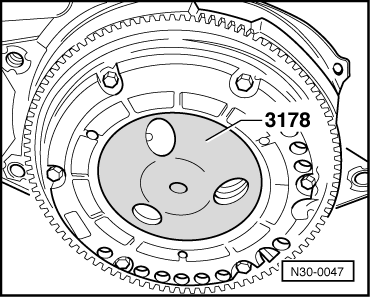
Special tools and workshop equipment requiredCentering disk 3178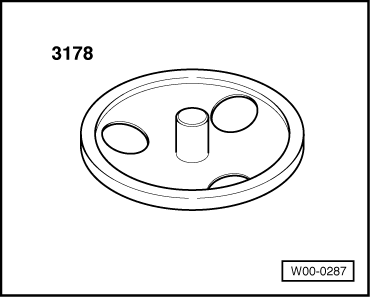
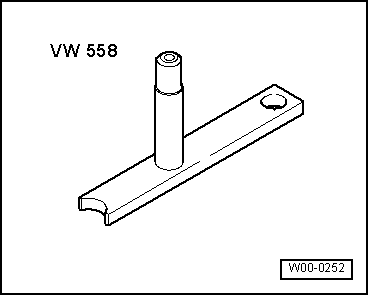
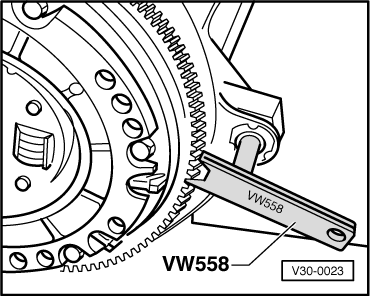
Lock flywheel using retainer for clutch VW 558.
Loosen flywheel bolts gradually and diagonally.
Take off flywheel together with clutch plate.
Lever retaining clip (A) for release plate (B) out of holes (arrows) using a screwdriver.
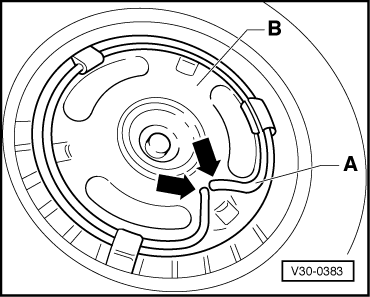
Remove retaining clip (A) together with release plate (B).
Lock pressure plate using retainer for clutch VW 558 and bolt (A).
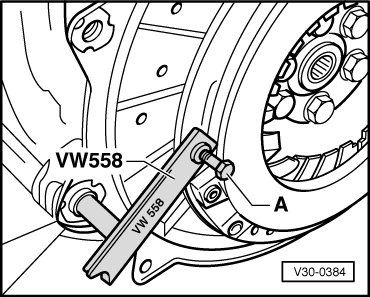
Loosen pressure plate bolts gradually and diagonally.
Remove pressure plate and intermediate plate.
Fit pressure plate.
Note
- The securing bolt holes in the pressure plate are offset. It can only be installed in one fitment position.
Fit intermediate plate.
Intermediate plate installation position: raised portion (arrow) points away from pressure plate.
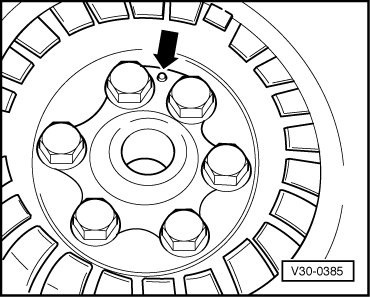
Insert new securing bolts.
Tighten securing bolts. Do this by locking pressure plate using retainer for clutch VW 558 as for removing.
Fit release plate (B) and secure to pressure plate with retaining clip (A).
Insert wire ends into holes (arrows) in release plate.
Coat clutch plate splines with a very thin film of grease G 000 100.
Slide clutch plate back and forth on gearbox input shaft until the hub slides on shaft easily.
Remove excessive grease.
Fit clutch plate and flywheel to pressure plate.
Insert centering disk 3178 and tighten flywheel bolts alternately and diagonally.
Parts & tools for this job For 1984 Volkswagen Citi Golf
- PARTClutch kitSearch: Volkswagen Citi Golf 1984 clutch kit
- TOOLClutch alignment toolSearch: clutch alignment tool
- FLUIDGear oilSearch: Volkswagen Citi Golf manual gearbox oil
As an Amazon Associate we earn from qualifying purchases.