
Removing and installing number plate light
- Make
- Volkswagen
- Model
- Crafter Mk1
- Year
- 2006–2016
- Section
- Box body › Removing and installing number plate light
‹ Prev Removing and installing tail light clusterNext › Removing and installing high-level brake light
Body: Box bodiesRemoving and installing number plate light
Removing and installing number plate light
Note
- The removal and installation procedure is described for the left-hand side. The removal and installation procedure for the right-hand side is basically the same.
Turn light switch to “0” position.
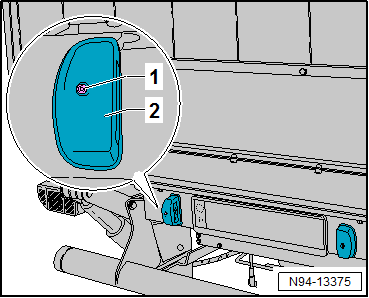
Remove bolt (1).
Remove cap (2).
Separate electrical connectors (1) from connector contacts.
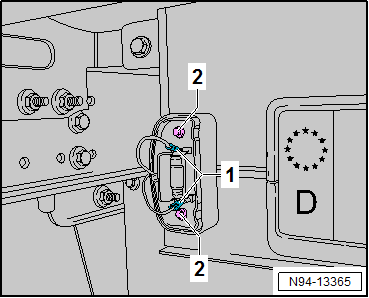
Remove bolts (2).
Remove number plate light from box body.
Install in reverse order, but note the following:
| Component | Specified torque |
|---|---|
| Bolts | 0.8 Nm |
‹ Prev Removing and installing tail light clusterNext › Removing and installing high-level brake light
Parts & tools for this job For 2006 Volkswagen Crafter
- TOOLTrim removal tool kitSearch: trim removal tool kit
- PARTTouch-up paintSearch: Volkswagen touch up paint
- PARTPanel clip assortmentSearch: Volkswagen panel clips assortment
As an Amazon Associate we earn from qualifying purchases.