
Removing and installing handbrake lever
- Make
- Volkswagen
- Model
- Crafter Mk1
- Year
- 2006–2016
- Section
- Handbrake › Removing and installing handbrake lever
Brake systemsRemoving and installing handbrake lever
Removing and installing handbrake lever
Pull front trim (1) off handbrake lever in (direction of arrow).
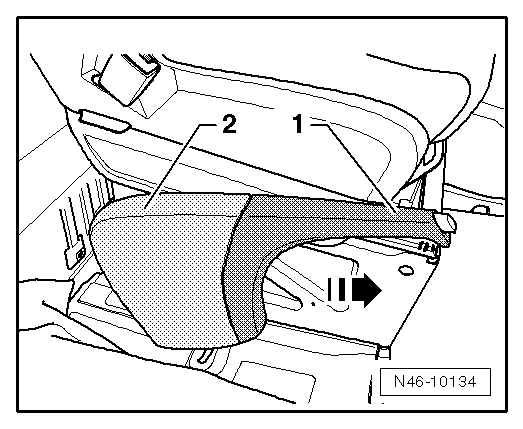
Remove rear trim (2) from handbrake lever.
The handbrake lever is in its lowest position, and is not applied.Disconnect connector (1) on handbrake warning switch F9.
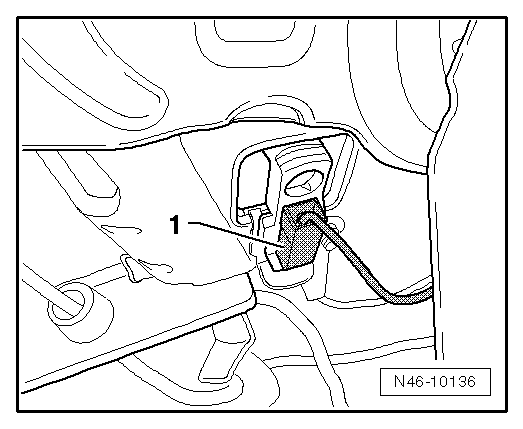
Remove retaining clip (1) and pull out securing pin for front handbrake cable out of handbrake lever.
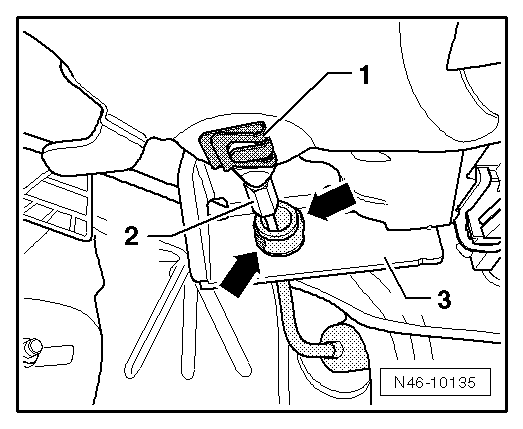
Press both lugs (arrows) together and slide front handbrake cable (2) out of handbrake lever (3).
Separate connection (1).
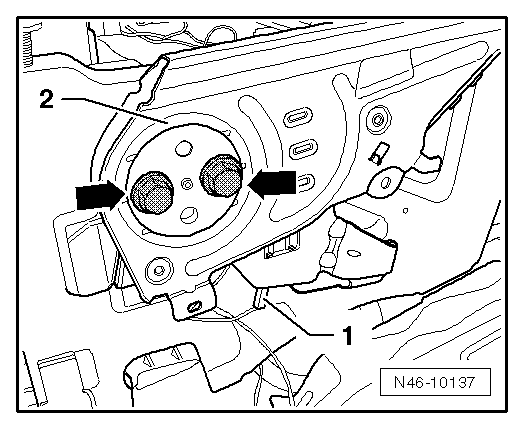
Unscrew bolts (arrows) and remove handbrake lever (2).
Install in reverse order.
Adjusting front handbrake cable → Chapter.
- Chapter“Assembly overview - handbrake lever”
Parts & tools for this job For 2006 Volkswagen Crafter
- PARTBrake padsSearch: Volkswagen Crafter 2006 brake pads
- TOOLBrake bleeder kitSearch: one man brake bleeder kit
- FLUIDBrake fluidSearch: brake fluid
As an Amazon Associate we earn from qualifying purchases.