
Removing and installing side light bulb
- Make
- Volkswagen
- Model
- Crafter Mk1
- Year
- 2006–2016
- Section
- Headlight › Removing and installing side light bulb
Removing and installing side light bulb
Note
- Removing and installing the bulbs is possible when the headlight is installed.
- The illustrations show the renewal of the right side light bulb M3.
- The renewal of the left side light bulb M1 is carried out in the same way.
- Depending on vehicle equipment, the daytime running light bulb L174/L175 may be installed at this position in vehicles as of week 22/2013 → Chapter.
Switch off ignition and all electrical loads, and pull out ignition key.
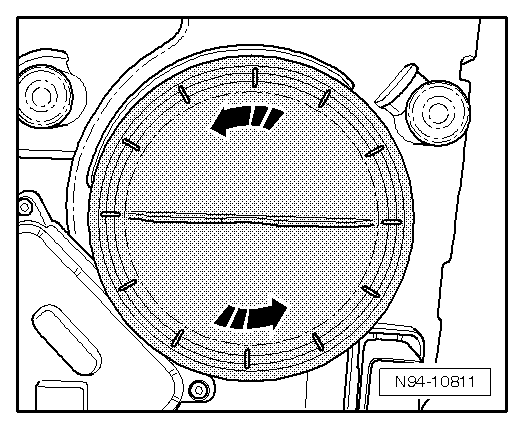
Turn upper cover in (direction of arrow) and remove it.
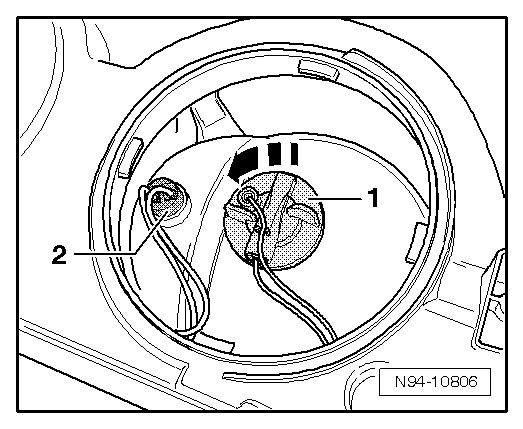
Pull bulb holder with side light bulb (2) out of headlight as far as wiring allows.
Pull side light bulb (2) in (direction of arrow) out of bulb holder (1).
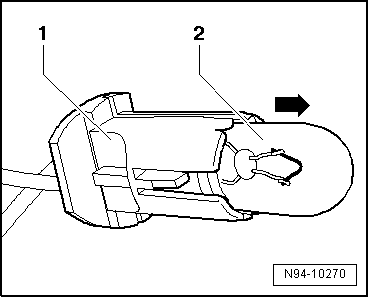
Side light bulb: 12 V, 5 W
Install in the reverse order of removal. When doing this, note the following:
Warning When installing, make sure cover is correctly seated. The ingress of water will lead to permanent damage to the headlight.
Do not touch bulb glass when installing a bulb. Fingers leave traces of grease on the glass, which evaporate when the bulb is switched on and cause the glass to cloud over.
Check functions of headlight.
Checking and, if necessary, adjusting headlight setting → Chapter.
Parts & tools for this job For 2006 Volkswagen Crafter
- PARTReplacement bulbsSearch: Volkswagen Crafter 2006 bulbs
- TOOLDigital multimeterSearch: automotive digital multimeter
As an Amazon Associate we earn from qualifying purchases.