
Removing and installing steering column
- Make
- Volkswagen
- Model
- Crafter Mk1
- Year
- 2006–2016
- Section
- Steering column › Removing and installing steering column
Removing and installing steering column
Warning The following conditions must be met before starting work on the electrical system and removing the steering wheel:
- Disconnect earth strap from battery Electrical systemRep. gr. 27 Disconnecting and reconnecting battery.
- Wheels must be in straight-ahead position.
Note or request radio code on vehicles with coded radio if necessary.
Turn wheels to straight-ahead position.
Remove ignition key with steering wheel in centre position.
Disconnect battery Electrical systemRep. gr. 27 Disconnecting and reconnecting battery.
Remove nut (arrow) from universal joint behind ABS unit (1) and remove bolt.
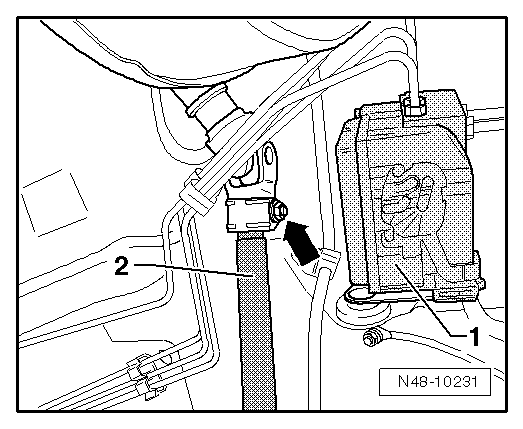
Pull intermediate shaft (2) out of universal joint.
Remove steering wheel → Chapter.
Remove steering column switch Electrical systemRep. gr. 94.
Remove driver footwell cover General body repairs, interiorRep. gr.70.
Remove steering column trim General body repairs, interiorRep. gr.70.
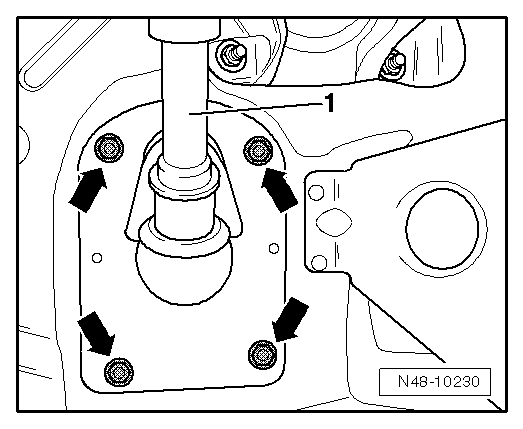
Remove nuts (arrows) securing steering column (1) from plenum chamber bulkhead.
Disconnect connector of electric steering column lock.
Remove nuts (arrows).
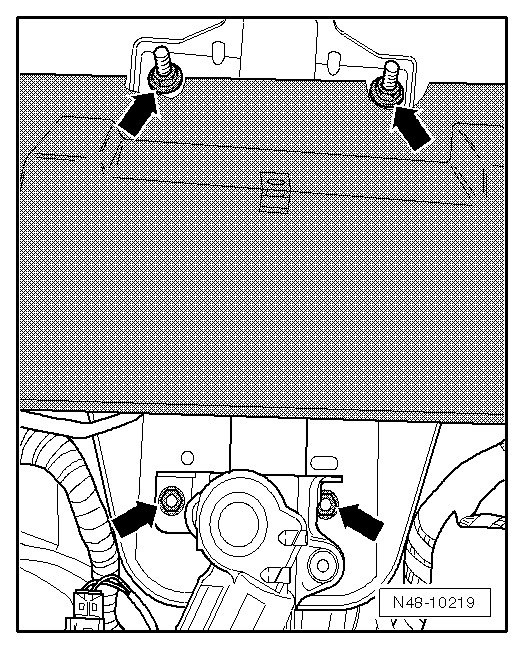
Pull steering column out of guides.
Turn steering column 180° so that electronic steering column lock points upwards.
Remove steering column from vehicle.
Install in reverse order. Note the following points:
- Chapter“Assembly overview - steering column”
- Chapter“Assembly overview - steering rack”
- Chapter“Assembly overview - steering rack, Crafter 4MOTION with Achleitner all-wheel drive”
- Chapter“Repairing steering rack”
Parts & tools for this job For 2006 Volkswagen Crafter
- TOOLTie rod end toolSearch: tie rod end puller
- TOOLBall joint separatorSearch: ball joint separator
- FLUIDPower steering fluidSearch: Volkswagen power steering fluid
As an Amazon Associate we earn from qualifying purchases.