
Removing and installing light switch E1
- Make
- Volkswagen
- Model
- Up! e-up!
- Year
- 2013–2023
- Section
- Controls › Removing and installing light switch E1
Removing and installing light switch E1
The following components are integrated into the light switch E1 depending on the equipment:
- Front and rear fog light switch E23
- Light switch illumination bulb L9
Switch off ignition and all electrical loads, and pull out ignition key.
Turn light switch E1 to “0” position.
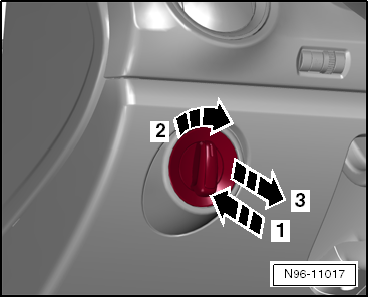
Push in light switch E1(1), and turn it towards right slightly (2).
Hold light switch E1 in this position, and pull it out (3), while taking into account the length of connected wires.
Disconnect connector.
Fit connector, and engage it.
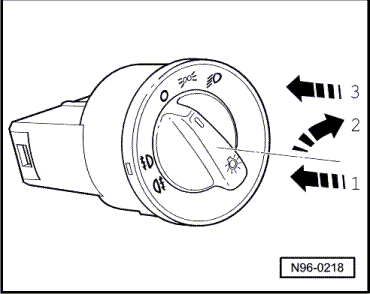
Hold light switch, and press rotary knob of light switch E1 firmly into dash panel (1), and then turn knob clockwise slightly (2).
Hold rotary grip in this position, and insert light switch E1 into dash panel (3).
Turn grip of light switch to position “0”, release and engage light switch E1.
Parts & tools for this job For 2013 Volkswagen Up!
- TOOLOBD2 scannerSearch: OBD2 scanner
- TOOLDigital multimeterSearch: automotive digital multimeter
- TOOLBack-probe test leadsSearch: back probe test leads
As an Amazon Associate we earn from qualifying purchases.