
Removing and installing number plate light X
- Make
- Volkswagen
- Model
- Up! e-up!
- Year
- 2013–2023
- Section
- Number plate light › Removing and installing number plate light X
Electrical systemRemoving and installing number plate light X
Removing and installing number plate light X
Note
- When removing and installing components that are in view (switches, covers, trim and so on), mask off areas in which tools (assembly wedge T10039/1, screwdriver) are used to lever out those components using commercially available masking tape.
Switch off ignition and all electrical loads, and pull out ignition key.
Lever left-hand side of number plate light (arrow) out of bumper cover, using a screwdriver.
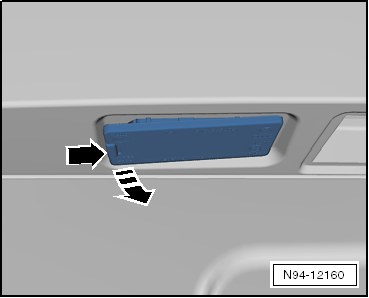
Pull number plate light out of bumper cover, taking connected wire lengths into account.
Turn bulb holder (1) in (direction of arrow) and pull out.
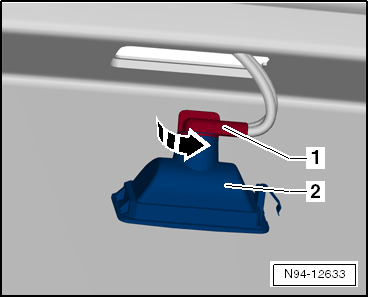
Remove number plate light (2).
Install in the reverse order of removal, observing the following:
Insert number plate light into bumper cover, starting at right.hand side, and then push it in on the left-hand side, making sure it is latched in place securely.
Check function of number plate light.
Parts & tools for this job For 2013 Volkswagen Up!
- TOOLDigital multimeterSearch: automotive digital multimeter
- PARTAssorted fuse kitSearch: car fuse assortment kit
- TOOLWire crimper and connector kitSearch: wire crimper connector kit
As an Amazon Associate we earn from qualifying purchases.