
Installing brackets
- Make
- Volkswagen
- Model
- Eos 1F
- Year
- 2006–2015
- Section
- Rear bumper cover > 12.2010 › Installing brackets
Installing brackets
Note
- The brackets are installed after the bumper cover has been painted.
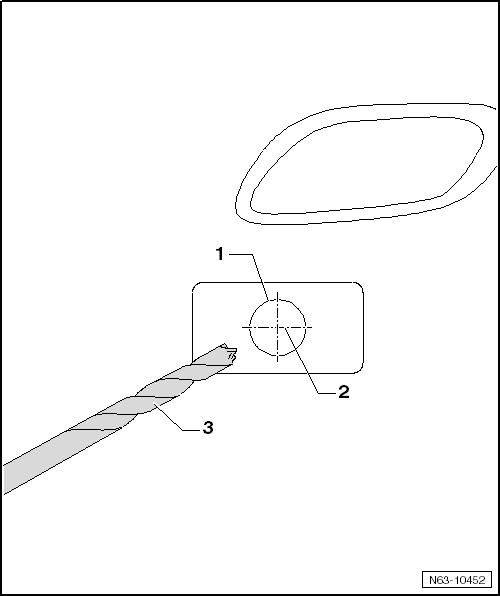
The 4 markings for a bracket (1) can be found on the inside of the bumper cover.
If there are no markings, the centre point (2) must be determined.
The holes must be drilled from the inside to the outside with the drill in the tool kit (3).
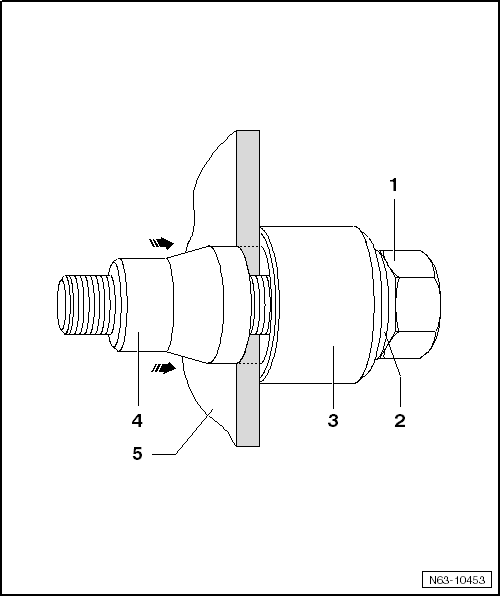
Set hole puncher in position with bolt head (1), washer (2) and thrust bearing (3) from inside bumper cover (5).
Screw on punch (4), not quite as far as bumper cover.
Press punch (4) against bumper cover.
Tighten hole puncher (1).
Note
- The punch (4) must not turn on the paint of the bumper cover.
Pull the punch (4) through the material of the bumper cover (5)(arrows) by turning the bolt head (1).
Remove hole puncher and make the next holes.
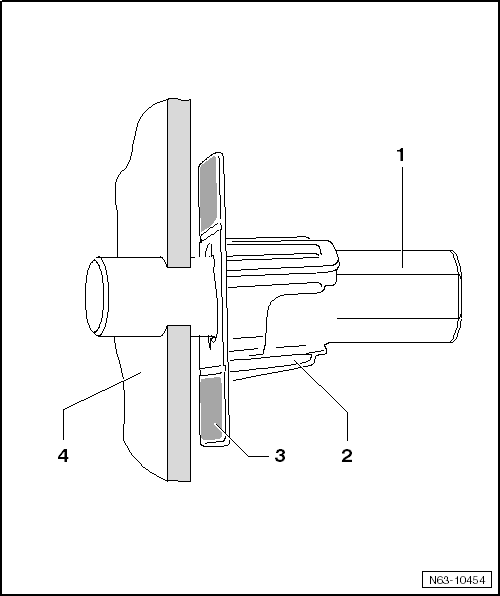
Thoroughly clean bonding surfaces on bumper cover (4).
Push bracket (2) onto centring pin (1).
Pull protective foil off double-sided adhesive tape (3) on bracket.
Insert centring pin (1) into hole until the bracket is touching the bumper cover (4).
Press bracket on forcefully in area of bonding surface (3).
Removing centring pin and repeat the procedure for all brackets.
Further work can carried out on bumper cover only after minimum curing period → Chapter.
Parts & tools for this job For 2006 Volkswagen Eos
- TOOLTrim removal tool kitSearch: trim removal tool kit
- PARTTouch-up paintSearch: Volkswagen touch up paint
- PARTPanel clip assortmentSearch: Volkswagen panel clips assortment
As an Amazon Associate we earn from qualifying purchases.