
Checking sequence
- Make
- Volkswagen
- Model
- Fox Brazil: Fox, SpaceFox, CrossFox
- Year
- 2010–2015
- Section
- Lubrication system components - remove and install › Checking sequence
Checking sequence
Remove Oil pressure switch F1(A) and install onto Oil pressure gauge VAG 1342.
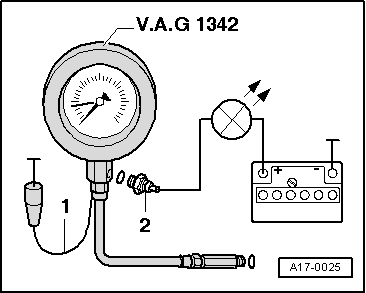
Install the Oil pressure meter VAG 1342 in place of the Oil pressure switch F1 on oil filter support.
Connect brown cable from the Oil pressure gauge VAG 1342 to the ground (-).
Couple the Test probe VAG 1527B with Auxiliary measuring cable set VAG 1594C to the positive terminal of the Battery A (+) and to the Oil pressure switch F1(B).
If the LED does light up, replace the Oil pressure switch F1.
Start the engine and let it run at a higher speed. Between 0.55... 035-bar pressure, the LED must go on; otherwise, replace theOil pressure switch F1.
Continue increasing engine speed. At 2000 rpm and an oil temperature of 80°C, the oil pressure should be about 2.0 bar.
Mechanical damage, e.g., eliminate bearing damages.
Replace the oil filter support with oil overpressure valve or the oil pump.
At higher speed, the oil pressure cannot be higher than 7,0 Bar.
Check oil lines.
If necessary, replace oil filter support with overpressure valve.
Parts & tools for this job For 2010 Volkswagen Fox
- PARTOil filterSearch: Volkswagen Fox 2010 oil filter
- TOOLOil filter wrenchSearch: oil filter wrench
- FLUIDEngine oilSearch: Volkswagen Fox engine oil
As an Amazon Associate we earn from qualifying purchases.