
Radio R“RNS 315” - remove and install
- Make
- Volkswagen
- Model
- Fox Brazil: Fox, SpaceFox, CrossFox
- Year
- 2010–2015
- Section
- CD Player R89 › Radio R“RNS 315” - remove and install
Radio R“RNS 315” - remove and install
Warning Before working on the electrical system, it is necessary to disconnect the Battery earth strap AElectrical systemRep. gr.27Starter, alternator, battery.
Note
- Safe working conditions for repairing the electrical system are created by disconnecting the ground cable from the Battery A
- Upon reconnecting the Battery A, check the vehicle equipment (radio, clock, power locks and windows, etc.) according to the repair manual and/or instructions for use.
- Whenever the Dash panel insert K is replaced, it is necessary to insert the anti-theft code “SAFE” on the Radio R.
Turn off the ignition and all electrical devices, then remove the ignition key.
If the vehicle is equipped with a CD player, remove any CD from the device Radio instruction manual.
Remove the lower centre frame of the dash panel Body - Internal assembly repairsRep. gr.68Internal equipment.
Remove the fastening screws (arrows).
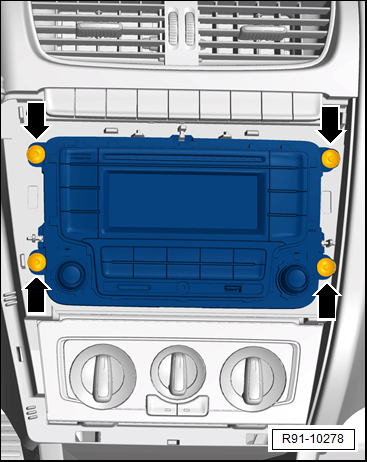
Carefully remove the Radio R.
Disconnect the cable from the Aerial R11.
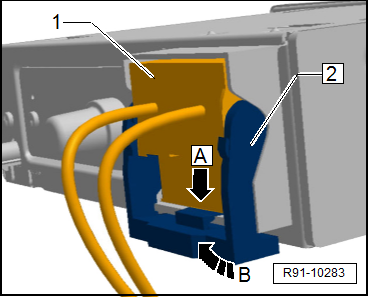
Disconnect the connectors (1) from the Radio R by pressing the lock according to (arrow A) and turning according to (arrow B).
Connect the Radio R connectors and the Aerial R11.
Align and fit the Radio R in its respective housing.
Note
- Align and fit the Radio R ensuring that the harnesses behind the radio are not “chewed”.
Tighten fastening screws (arrows) to (1.5 Nm) torque.
Warning Never press the command keys or the display during installation, otherwise the device may be damaged.
Parts & tools for this job For 2010 Volkswagen Fox
- TOOLDigital multimeterSearch: automotive digital multimeter
- PARTAssorted fuse kitSearch: car fuse assortment kit
- TOOLWire crimper and connector kitSearch: wire crimper connector kit
As an Amazon Associate we earn from qualifying purchases.