
Radio R“Concept” - remove and install
- Make
- Volkswagen
- Model
- Fox Brazil: Fox, SpaceFox, CrossFox
- Year
- 2010–2015
- Section
- Radio R › Radio R“Concept” - remove and install
Radio R“Concept” - remove and install
Special tools and workshop equipment requiredKey T 10057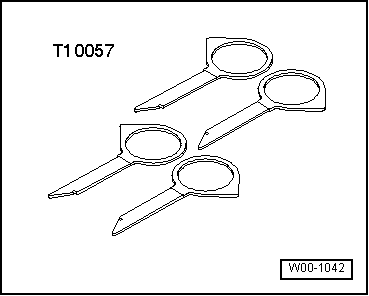
Turn off the ignition and all electrical devices, then remove the ignition key.
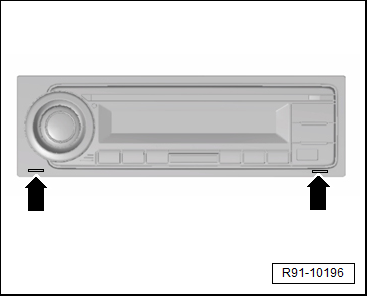
Insert the Key T 10057 into the front notches (arrows) of the device, as indicated next:
Remove the Radio R“Concept” from the panel, by pulling it with the Wrench T 10057 in the direction of the (sets).
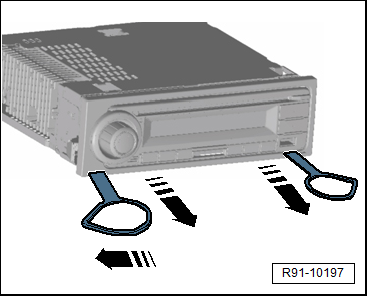
Pull the device out of its housing until the rear connectors are accessible.
Disconnect the Radio R“Concept” connectors and the Aerial R11cable.
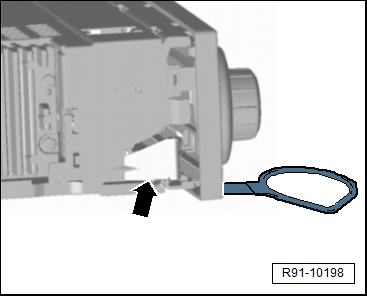
After removing the Radio R“Concept”, remove the Key T 10057 by pressing the lock (arrow).
Connect the Radio R“Concept” connectors and the Aerial R11cable.
Install the Radio R“Concept”, inserting it into the panel housing until it fully attaches.
Warning Never press the command keys or the display during installation, otherwise the device may be damaged.
Activate the electronic anti-theft alarm system, if necessary → Chapter.
Parts & tools for this job For 2010 Volkswagen Fox
- TOOLDigital multimeterSearch: automotive digital multimeter
- PARTAssorted fuse kitSearch: car fuse assortment kit
- TOOLWire crimper and connector kitSearch: wire crimper connector kit
As an Amazon Associate we earn from qualifying purchases.