
Main fuse holder (Version 1) - remove and install
- Make
- Volkswagen
- Model
- Fox Brazil: Fox, SpaceFox, CrossFox
- Year
- 2010–2015
- Section
- Fuse box › Main fuse holder (Version 1) - remove and install
Main fuse holder (Version 1) - remove and install
Turn the ignition and all electric consumers off, and remove the key from ignition.
Disconnect the Battery AChapter.
Release the lock (arrow A) from the cover (1) of the positive pole of the Battery A and move the cover (1) towards ( arrow B).
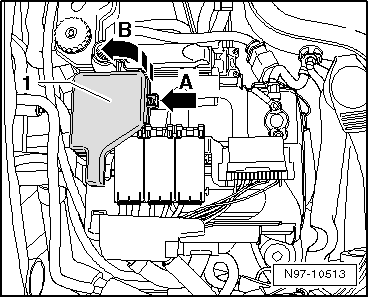
Release the locks (arrows A) of the cover (1).
Tilt the cover (1) towards (arrow B).
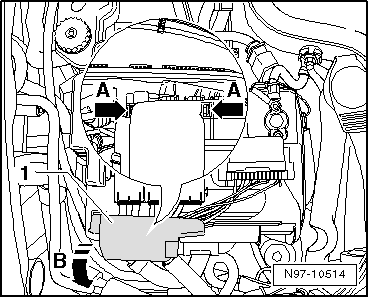
Release the securing nut (2) and remove the cable (B+) (1).
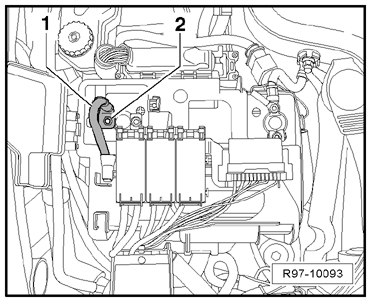
Unlock (arrows A) the fuse covers (1) and lift them towards ( arrow B).
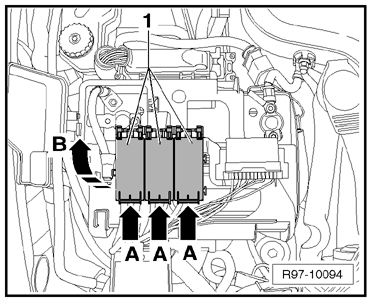
Release the fastening locks (arrows) and remove the cover (1).
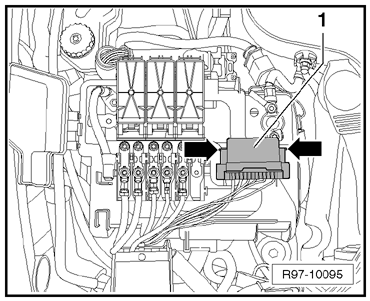
Identify the pinout of cable terminals (A) with cable terminals(B).
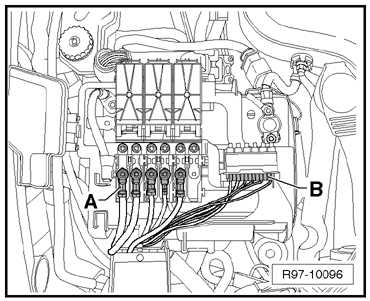
Remove the fastening nuts (1) and remove the fuses (2).
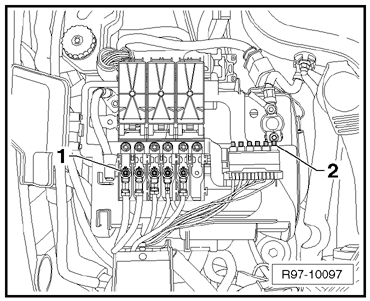
Unlock the fuse holder (1) by moving it towards the (arrow).
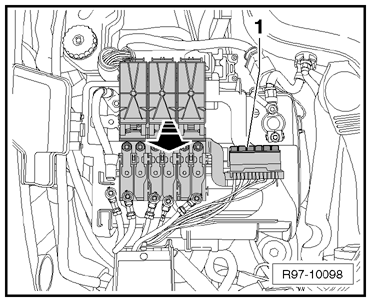
Remove the cable contacts with the tool indicated in the Harness repair set VAS 1978.
Remove the fuse box.
Installation is performed in reverse sequence to the removal, considering the following:
Ensure the correct pinout and mounting of all cables to be connected.
Tighten the fastening nuts with (6 ± 1 Nm) torque.
Mount fuses according to the electric diagram Current flow diagrams, Electrical fault finding and Fitting locations.
Parts & tools for this job For 2010 Volkswagen Fox
- TOOLDigital multimeterSearch: automotive digital multimeter
- PARTAssorted fuse kitSearch: car fuse assortment kit
- TOOLWire crimper and connector kitSearch: wire crimper connector kit
As an Amazon Associate we earn from qualifying purchases.