
Magnetic switch - remove and install
- Make
- Volkswagen
- Model
- Fox 5Z, Europe
- Year
- 2005–2011
- Section
- Starting motor › Magnetic switch - remove and install
‹ Prev Starter B - (Manufacturer Valeo) - disassemble and assembleNext › Armature and gearing pinion - remove and install
Electrical systemMagnetic switch - remove and install
Magnetic switch - remove and install
Turn off the ignition, all the electrical devices, and remove the key from ignition.
Disconnect the Battery AChapter.
Remove the Starter BChapter.
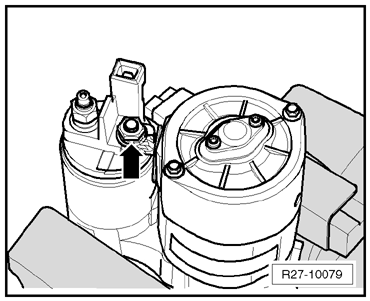
Loosen the securing nut (arrow) (9.5 Nm) and disconnect the brush cable.
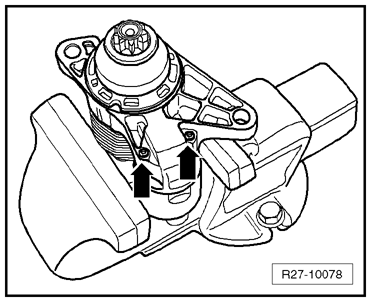
Remove the fastening screws (arrows) (3.75 Nm) from the magnetic switch.
Note
- Use a good quality wrench. If removal is difficult, hit the screw heads sharply a few times with a pointed punch.
Remove the magnetic switch.
Installation is performed in reverse sequence to the removal, considering the following:
Install the spring and magnetic switch, and fasten the magnetic switch screws to (3.75 Nm).
Connect the brush cable by fastening it with the nut tightened to (9.5 Nm).
Install the Starter BChapter.
‹ Prev Starter B - (Manufacturer Valeo) - disassemble and assembleNext › Armature and gearing pinion - remove and install
Parts & tools for this job For 2005 Volkswagen Fox
- TOOLOBD2 scannerSearch: OBD2 scanner
- TOOLDigital multimeterSearch: automotive digital multimeter
- TOOLBack-probe test leadsSearch: back probe test leads
As an Amazon Associate we earn from qualifying purchases.