
"CD player" R89„Concept“ - remove and install
- Make
- Volkswagen
- Model
- Gol G4 with Parati and Saveiro, Brazil
- Year
- 2005–2014
- Section
- CD Player R89 › "CD player" R89„Concept“ - remove and install
"CD player" R89„Concept“ - remove and install
Note
- Check if the vehicle has a coderadio. If so, request the anti-theft code before disconnecting the Battery Aearth strap
- Safe working conditions for repairing the electrical system are created by disconnecting the ground cable from the Battery A (interrupting the current)
- Upon reconnecting the Battery A, check the vehicle equipment (radio, clock, power locks and windows, etc.) according to the repair manual and/or instructions for use
Remove the CD, if any, from the equipment Radio Instruction Manual.
Turn off the ignition and all electrical devices, then remove the ignition key.
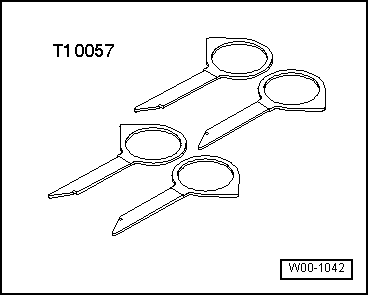
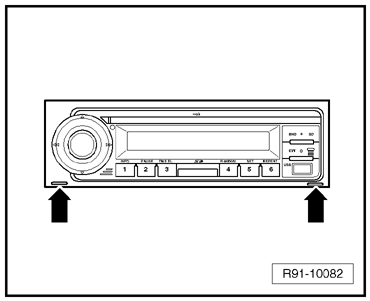
Insert the Key T 10057 into the lower equipment sides (arrows) until they fit.
Remove the "CD player" R89„Concept“ from the dash by pulling it with the Screwdriver T 10057 in the direction of the (arrows).
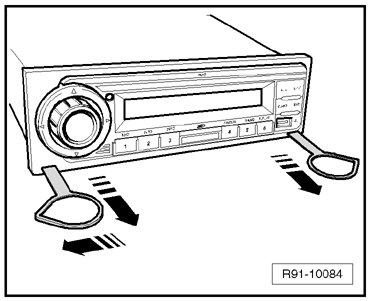
Pull the device out of its housing until the rear connectors are accessible.
Disconnect the "CD player" R89„Concept“ connectors and cable for the Antenna R11.
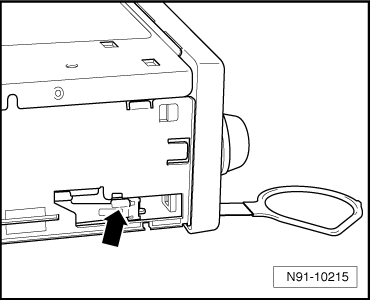
After removing the "CD player" R89„Concept“, remove each Key T 10057 by pressing the lock (arrow ).
Connect the "CD player" R89„Concept“ connectors and cable for the Antenna R11.
Install the "CD player" R89„Concept“, by fitting it completely into the housing in the panel.
Note
- Never press the command keys or the display during installation, otherwise the device may be damaged.
Activate the electronic anti-theft alarm system, if necessary → Chapter.
Parts & tools for this job For 2005 Volkswagen Gol
- TOOLDigital multimeterSearch: automotive digital multimeter
- PARTAssorted fuse kitSearch: car fuse assortment kit
- TOOLWire crimper and connector kitSearch: wire crimper connector kit
As an Amazon Associate we earn from qualifying purchases.