
Removing and installing clipped number plate light
- Make
- Volkswagen
- Model
- Golf Mk6 Cabriolet
- Year
- 2011–2016
- Section
- Number plate light › Removing and installing clipped number plate light
Electrical systemRemoving and installing clipped number plate light
Removing and installing clipped number plate light
Switch off ignition and all electrical loads, and pull out ignition key.
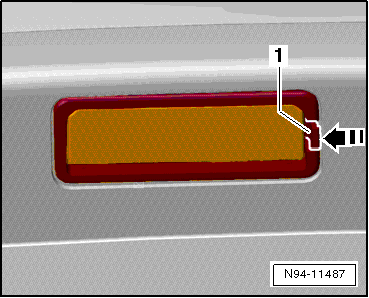
Push retaining lug (arrow) towards number plate light until number plate light can be swivelled out of bumper cover.
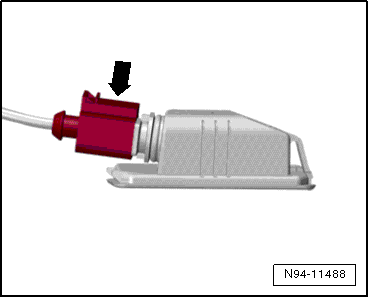
Release connector (arrow) and pull off.
Install in the reverse order of removal. When doing this, note the following:
Note
- When installing, insert number plate light into bumper cover so that connector is oriented to left side of vehicle.
Check function of number plate light.
Parts & tools for this job For 2011 Volkswagen Golf
- TOOLDigital multimeterSearch: automotive digital multimeter
- PARTAssorted fuse kitSearch: car fuse assortment kit
- TOOLWire crimper and connector kitSearch: wire crimper connector kit
As an Amazon Associate we earn from qualifying purchases.