
Removing and installing right aerial module R109
- Make
- Volkswagen
- Model
- Golf Mk5 Estate
- Year
- 2007–2009
- Section
- Aerial systems › Removing and installing right aerial module R109
‹ Prev Removing and installing aerial modules on rear windowNext › Removing and installing navigation system aerial R50
Electrical: CommunicationRemoving and installing right aerial module R109
Removing and installing right aerial module R109
Switch off ignition and all electrical consumers and pull out ignition key.
Remove strip roof leading edge General body repairs, interiorRep. Gr.70.
Loosen connectors (1), (2) and (3) and pull them off.
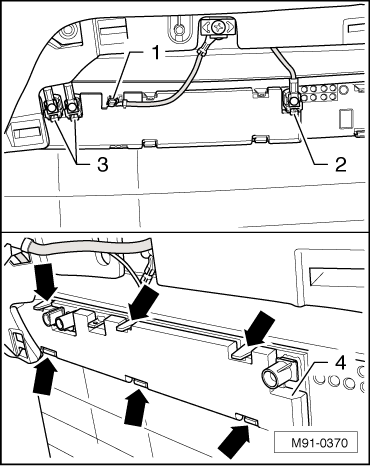
Loosen front retaining clips (arrows) and swing right aerial module R109 downwards.
Loosen rear retaining clips (arrows) and carefully take right aerial module R109(4) off.
Fit the right aerial module R109(4) into the rear retaining clips (arrows).
Swing the right aerial module R109(4) upwards and lock it in the front retaining clips (arrows).
Note
- The contacts on the right aerial module R109(arrows) are not allowed to be bent and the metal must be clean in order to avoid reception problems.
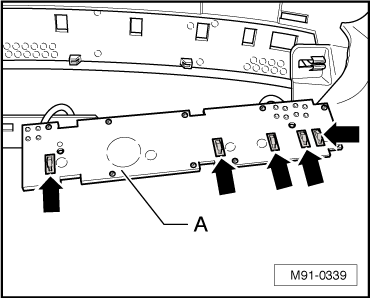
Remainder of installation is carried out in reverse order of removal.
‹ Prev Removing and installing aerial modules on rear windowNext › Removing and installing navigation system aerial R50
Parts & tools for this job For 2007 Volkswagen Golf
- TOOLOBD2 scannerSearch: OBD2 scanner
- TOOLDigital multimeterSearch: automotive digital multimeter
- TOOLBack-probe test leadsSearch: back probe test leads
As an Amazon Associate we earn from qualifying purchases.