
Overview – iPod holder R192
- Make
- Volkswagen
- Model
- Golf Mk5 Estate
- Year
- 2007–2009
- Section
- iPod holder R192 › Overview – iPod holder R192
Overview – iPod holder R192
Note
- When dealing with complaints, it is absolutely necessary to understand the functions and the operation of the iPod holder R192Operating manual.
- When the battery A is reconnected, check vehicle equipment (radio, clock, convenience electronics) in accordance with Electrical systemRep. gr.27Battery, Disconnecting and reconnecting battery and the Owner's manual.
An iPod holder R192 can be ordered as optional equipment.
The iPod is available in different versions. The iPod holder R192 can be used with the following iPods:
- 3rd and 4th generation iPods
- iPod mini
- iPod photo
The iPod is inserted into the iPod holder R192; the contents of the iPod can now be displayed and selected on the radio or RNS display. The iPod is supplied with voltage via the iPod holder R192.
All of the iPod's audio data can be played via the radio system; however, photos and ID3 tags cannot be shown. Only the track list number of the files (track xx) is shown on the radio or RNS display.
The files are transferred in the same way from the iPod to the radio or RNS system.
The iPod holder R192 is not capable of self-diagnosis.
Fault finding procedure → Chapter.
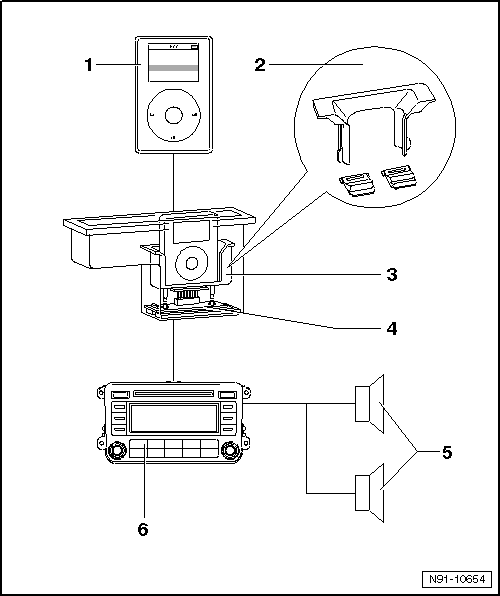
- iPod
- Adapter
Adapting holder to iPod
Removing and installing adapter → Chapter - iPod holder R192
In centre console
Removing and installing → Chapter. - Electronics
Cannot be replaced as single part
Connector assignment → Chapter. - Loudspeaker systems
- Radio/RNS
Parts & tools for this job For 2007 Volkswagen Golf
- TOOLDigital multimeterSearch: automotive digital multimeter
- PARTAssorted fuse kitSearch: car fuse assortment kit
- TOOLWire crimper and connector kitSearch: wire crimper connector kit
As an Amazon Associate we earn from qualifying purchases.