
Removing and installing radio “RCD 210”
- Make
- Volkswagen
- Model
- Golf Mk5 Estate
- Year
- 2007–2009
- Section
- Radio system “RCD 210” › Removing and installing radio “RCD 210”
Removing and installing radio “RCD 210”
Note
- The spare part number for the radio R unit can be found on a sticker on the radio R unit housing.
- If the radio R and navigation system has to be replaced, deactivate the anti-theft system → Chapter.
Take CD out of radio R unit Owner's Manual.
Switch off ignition and all electrical consumers and pull out ignition key.
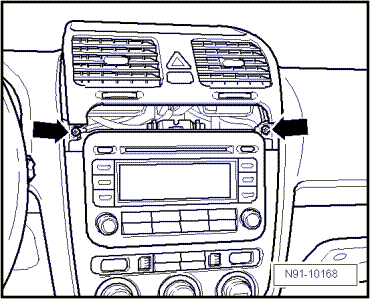
Remove the upper cover with air vents from centre of dash panel until the screws underneath for the centre console cover are accessible, General body repairs, exteriorRep. Gr.68.
Remove bolts (arrows) (1.5 Nm).
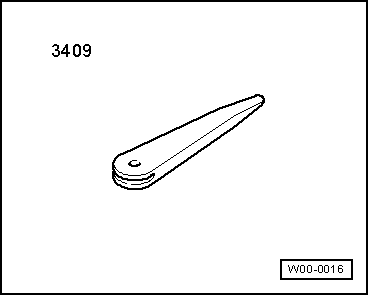
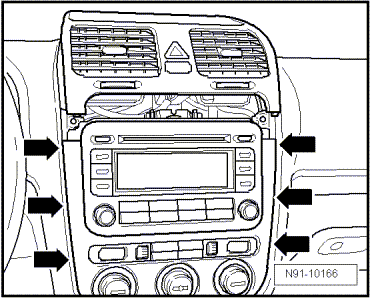
Carefully lever out cover of centre console using removal wedge 3409(arrows) and take it off.
Remove bolts (arrows) (1.5 Nm) on radio R.
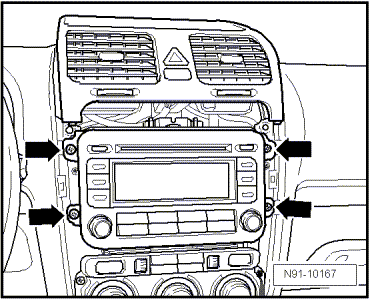
Take the radio R out of the shaft until the connectors on the back of the radio R come up.
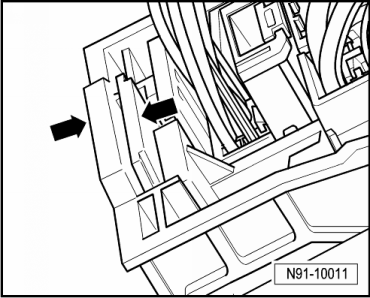
Press together connector locking mechanism in direction of (arrows).
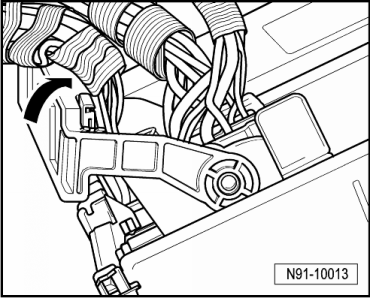
Then swing locking bar up in direction of (arrow) and pull off connectors.
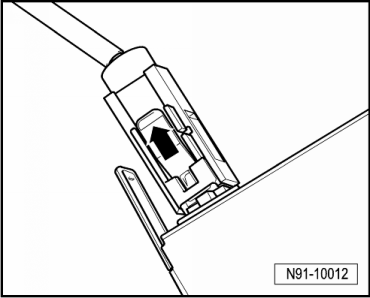
Release connector (arrow) on aerial connection and pull it off.
Fit connectors on the radio R unit and lock them.
Push the radio R unit straight into the dash panel.
Note
- Never press on the display or the operating buttons when fitting the radio R unit, as the radio R unit may be damaged.
Fit the radio R unit with 4 bolts (arrows) (1.5 Nm).
Install centre console cover again.
Deactivate the electronic anti-theft system → Chapter.
Check the radio R unit code and recode the radio R unitChapter.
Parts & tools for this job For 2007 Volkswagen Golf
- TOOLDigital multimeterSearch: automotive digital multimeter
- PARTAssorted fuse kitSearch: car fuse assortment kit
- TOOLWire crimper and connector kitSearch: wire crimper connector kit
As an Amazon Associate we earn from qualifying purchases.