
Installing multifunction switch F125
- Make
- Volkswagen
- Model
- Golf Mk6 Estate
- Year
- 2009–2013
- Section
- Multifunction switch F125 › Installing multifunction switch F125
Installing multifunction switch F125
Special tools and workshop equipment requiredTorque wrench V.A.G 1331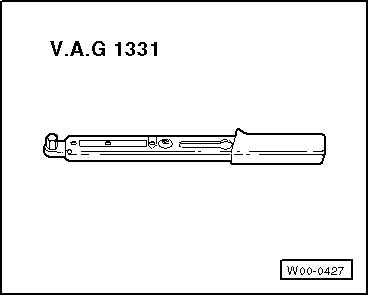
Install in the reverse order of removal, observing the following:
Place multifunction switch (4) on selector shaft (6).
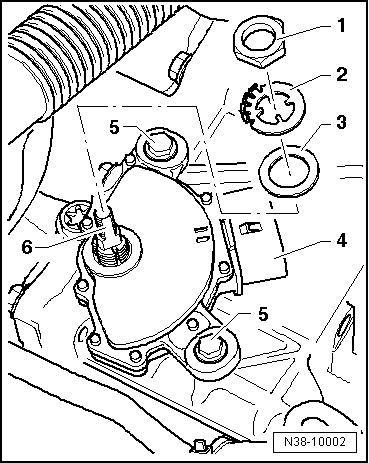
Tighten securing bolts (5) for multifunction switch hand-tight.
Bend hooks of lock washer (2) back.
Put washers (2) and (3) on selector shaft (6).
Install washer (2) with hooks pointing up.
Install washer (2) with long, narrow guides in long, narrow recesses of selector shaft (6).
Tighten nut (1) to 7 Nm.
Secure nut (1) by bending up hooks on lock washer (2).
Renew securing clip if hooks have broken off.
Push lever (3) onto selector shaft (4).
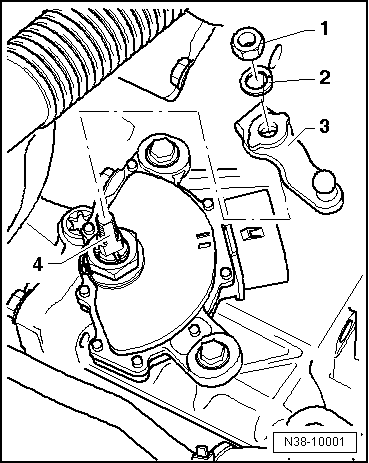
Use lever (3) to shift gearbox to “P” position, i.e. press lever (3) back (opposite direction of travel) to stop.
Now use lever (3) to shift gearbox to “N” position. To do this, push lever (3) two detent positions forwards in direction of travel.
Adjust multifunction switch F125Chapter.
Place spring ring (2) and nut (1) on selector shaft (4).
Tighten nut (1) to 13 Nm.
Check selector mechanism → Chapter.
If removed beforehand, install air filter housing:
- Petrol engine Rep. gr.24Injection system; Removing and installing air filter.
- Diesel engine Rep. gr.23Diesel direct injection system; Assembly overview - air filter.
Parts & tools for this job For 2009 Volkswagen Golf
- TOOLOBD2 scannerSearch: OBD2 scanner
- TOOLDigital multimeterSearch: automotive digital multimeter
- TOOLBack-probe test leadsSearch: back probe test leads
As an Amazon Associate we earn from qualifying purchases.