
Removing and installing handbrake cable
- Make
- Volkswagen
- Model
- Golf Mk6 Estate
- Year
- 2009–2013
- Section
- Handbrake › Removing and installing handbrake cable
Removing and installing handbrake cable
Release handbrake.
Remove centre console General body repairs, interiorRep. gr.68Compartments, covers and trims.
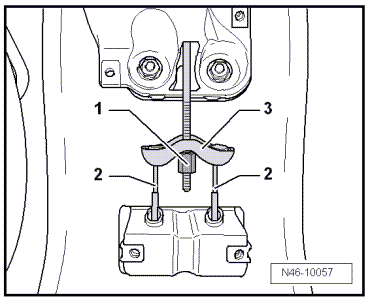
Release adjustment nut (1) until relevant handbrake cable (2) can be detached from compensator (3).
Push lever on brake caliper (2) in direction of arrow, and unhook handbrake cable (3).
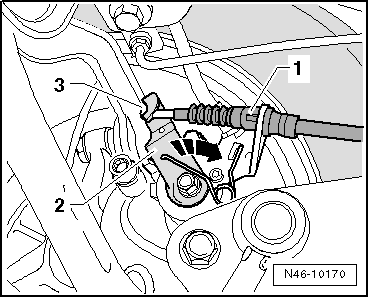
Press together locking lugs (1), and pull handbrake cable out of bracket on brake caliper.
First, unclip handbrake cable (1) from mountings.
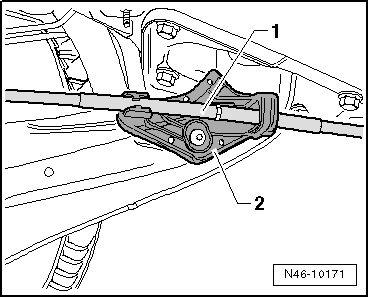
Then, pull it out of bracket (2) completely.
Detach handbrake cable from bracket (1).
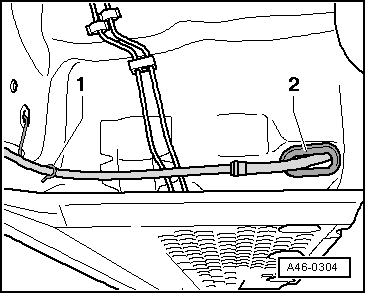
Pull handbrake cable out of guide tube (2).
Push handbrake cable into guide tube (2) and hook onto retainer (1).
Insert handbrake cable (1) through opening, and clip it onto bracket (2).
Push handbrake cable into bracket on brake caliper until both locking lugs (1) engage.
Push lever on brake caliper (2) in direction of arrow.
Attach handbrake cable (3).
The handbrake cable must be installed without tension between the brake caliper bracket and the bracket on the trailing arm.
Attach handbrake cable (2) to compensator (3).
Pretension handbrake cable with adjustment nut (1).
Adjust handbrake → Chapter.
Parts & tools for this job For 2009 Volkswagen Golf
- PARTBrake padsSearch: Volkswagen Golf 2009 brake pads
- TOOLBrake bleeder kitSearch: one man brake bleeder kit
- FLUIDBrake fluidSearch: brake fluid
As an Amazon Associate we earn from qualifying purchases.